
下载来源
Device Configuration
Split APKs Installation Guide
某些应用以 Split APKs(打包在一起的多个 .apk 文件)形式分发以优化资源。标准的 Android 安装程序无法打开它们。
相关应用


新版变化
Fixes some known issues.
关于此应用
Key Improvements to Shelf:
Access Shelf from anywhere
You can open Shelf from the top right section of the status bar, from your home screen, or when any other app is open. This helps to open Shelf anytime and access your cards & widgets.
Personalisation with resizable cards
With the new Shelf, you can resize the cards to multiple sizes based on your choice and rearrange the cards within the grid. Currently Toolbox & Notes cards supports multiple sizes.
A smarter Scout search
Search for apps, shortcuts, files, contacts, settings & more. Users in India & North America can also search for music, movies, artists, food & more.
Cards available on Shelf:
1. Scout search bar: You can search by text or voice commands. Alternatively, you can also pull down the Shelf screen to open Scout.
2. Weather information: Get weather information for your live location
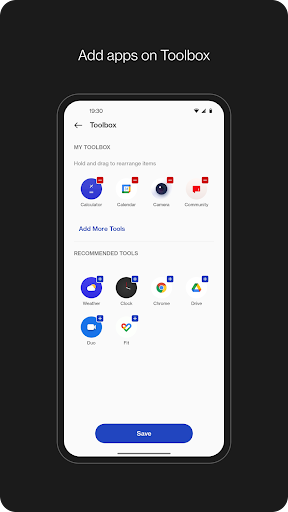
3. Toolbox: Add apps of your choice to Shelf to quickly open when you need them.
4. Step Counter or Health card: Count daily steps to keep track of your activity. When your device is connected to OnePlus Watch, you get additional data from Health app for workout, calories burnt, & activity period along with step count.
5. Data usage: Keep track of your mobile data usage per bill cycle. If the data limit is set, you can see the graph for data consumed & data left within the bill cycle.
6. Storage usage: Keep track of the storage used & left on your device.
7. Notes: Write quick notes on Shelf & set reminders. If OnePlus Notes app is installed, notes created on Shelf will also be available to access from OnePlus Notes app.
8. Sports: Get live scores, upcoming matches for your favorite teams in Cricket & Football. Sports card is available for users in India only.
9. Widgets: Add widgets from apps installed on device.
如何下载 OnePlus Shelf APK
- 在 APK Downloader 首页 输入应用包名
com.oneplus.opshelf。 - 选择您的设备架构(现代设备推荐选择 ARM64)。
- 点击 下载 获取合并后的 APK 文件。
- 传输并安装 APK 到您的 Android 设备上。
- 保持更新: 定期访问 APK Downloader 以搜索并下载您最喜爱的应用的最新安全版本。
安全与签名验证
此 APK 下载 100% 安全。我们验证文件的加密签名与官方开发者的凭据相匹配。无任何修改或广告注入。