
Fuentes de descarga
Device Configuration
Guía de instalación de APKs divididas (Split APKs)
Algunas aplicaciones se distribuyen como APKs divididas (varios archivos .apk empaquetados juntos) para optimizar recursos. Los instaladores estándar de Android no pueden abrirlas.
Aplicaciones Relacionadas




Novedades
Assorted bug fixes and smaller improvements.
Acerca de esta aplicación
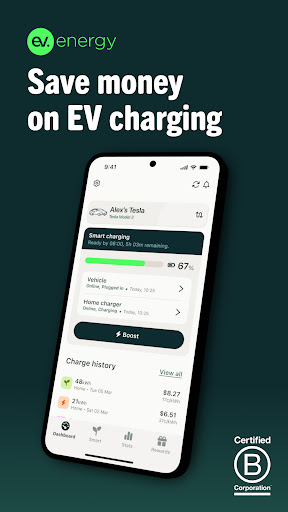
Smart home charging for your car with ev.energy: a greener, smarter way to charge your electric vehicle. Let’s plug into better!
OPTIMIZE YOUR EV CHARGING
• We manage charging on your EV
• Automatically shift your charging away from peak times using the greenest, cheapest energy available
NO EXTRA HARDWARE REQUIRED*
• Tesla and selected smart cars** can charge with any home set up
• Smart charge any electric vehicle using a compatible smart home charger
SAVE MONEY, CHARGE GREENER
• Plug in your vehicle at home and set when you need your car ready by
• We'll take care of the rest by charging during off-peak hours
CHARGE WITH SUNSHINE
• Our clever solar smart charging algorithm uses your self-generated solar power to deliver 100% renewable energy to your EV.
TRACK YOUR USAGE
• Easily track your EV’s carbon impact and energy consumption at home and on the go (On the go tracking currently only available for Tesla drivers who sign in with their Tesla account)
READY WHEN YOU NEED IT
• Need your car to charge right away? Override our smart EV charging schedule at any time by tapping the Boost button.
EV CHARGING REWARDS
• Earn reward points by smart charging and spend them on smart rewards, from gift cards to zero carbon EV charging with carbon off-setting.
-----
If you're using the ev.energy app, we’d love to know what you think. Is there something we can improve? Let us know via support@ev.energy.
Want to keep up with the latest EV news?
Like us on Facebook - https://www.facebook.com/evdotenergy
Follow us on Instagram - https://www.facebook.com/evdotenergy
-----
*Smart car users will not need a compatible charger to use the ev.energy app.
**Smart cars currently compatible with ev.energy are as follows:
Tesla
VW (excluding ID series)
Audi
BMW
Jaguar
Renault
SEAT
Skoda (excluding Enyaq)
Porsche
Mini
Volvo
Cómo descargar ev.energy: Home EV Charging APK
- Ingrese el nombre del paquete
energy.ev.appen la página de inicio de APK Downloader. - Seleccione la arquitectura de su dispositivo (se recomienda ARM64 para dispositivos modernos).
- Haga clic en Descargar para obtener el archivo APK fusionado.
- Transfiera e instale el APK en su dispositivo Android.
- Manténgase actualizado: Visite APK Downloader regularmente para buscar y descargar las últimas versiones seguras de sus aplicaciones favoritas.
Seguridad y Verificación de Firma
Esta descarga de APK es 100% segura. Verificamos que la firma criptográfica del archivo coincida con las credenciales oficiales del desarrollador. No se inyectan modificaciones ni adware.