
Fuentes de descarga
Device Configuration
Guía de instalación de APKs divididas (Split APKs)
Algunas aplicaciones se distribuyen como APKs divididas (varios archivos .apk empaquetados juntos) para optimizar recursos. Los instaladores estándar de Android no pueden abrirlas.
Aplicaciones Relacionadas




Novedades
-Various bug fixes
Acerca de esta aplicación
AUTOsist provides simple and affordable solutions for fleet managers including our fleet maintenance and management app. Our software is rated the best fleet maintenance software and mobile fleet management app by Forbes and users.
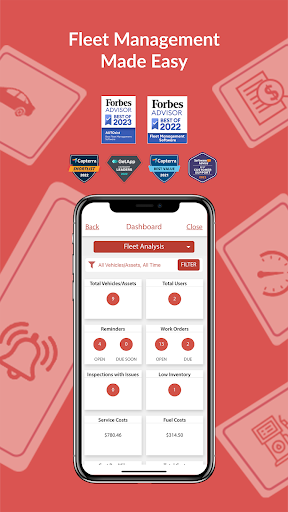
AUTOsist’s mobile fleet management app makes it easy to keep track of critical fleet operations from your mobile device, while drivers can update digital vehicle inspection forms and maintenance staff can communicate work order status updates.
Ideal for fleets of any size with assets like vehicles, trucks, trailers and equipment, our tools provide a means to manage every aspect of your fleet from our online web portal or wherever you go using our intuitive mobile fleet management app.
AUTOsist gives you an easy way to log and record maintenance, gas/fuel economy (monitor MPG), reminders, inspections and more. Track your fleet’s GPS location and mitigate risks with two-way facing safety dash cameras.
Fleet Maintenance and Management Plans For All:
Choose from one of our special plans and take advantage of our exclusive fleet offers to increase efficiency, reduce downtime, and costs.
Why use AUTOsist?
- Preventative maintenance schedules and service history logs
- Manage your entire fleet maintenance workflow
- Electronic pre-trip vehicle and equipment inspection forms
- Automated work orders with status updates
- GPS location tracking and geofencing
- Real-time odometer readings to trigger maintenance work orders
- Parts inventory management
- Fuel card integrations with fuel purchase history for each vehicle
- GPS and telematics with location tracking and real-time odometer readings
- Custom fleet reports for expenses and maintenance
- Integrated safety dash camera
FLEET MANAGEMENT
- Manage critical fleet operations in one easy-to-use dashboard
- Set reminders for anything you find important (Set by date and/or mileage)
- Desktop Web Portal that syncs with the app
- Export fleet management reports via PDF or Excel
- Manage user access and permissions and assign vehicles to drivers
FLEET MAINTENANCE
- Set preventative maintenance schedules for each asset with due soon maintenance reminders
- Automatically generate service work orders for maintenance staff to complete
- Receive status updates from maintenance staff and track the time it takes to complete service
- Manage parts inventory across locations and include details in work orders
- Transfer service and vehicle records to anyone with just one click
ELECTRONIC INSPECTIONS
- Fleet Inspections to stay DOT compliant
- Create custom inspection checklists for vehicles, trailers and equipment
- Get notified when something is marked not in proper working order
- eDVIRs and pre-trip inspections
- Trigger work orders for maintenance staff based on inspection failures
GPS TRACKING & TELEMATICS
- Track real-time GPS locations of your vehicles and equipment
- Geofencing and mapping to ensure fleets are within their route
- Use updated odometer syncs to schedule maintenance work orders
- In-cab alerts for unsafe driving, speeding, and harsh braking
- Safe driver leaderboards
SAFETY DASH CAMERAS
- Two-way facing safety dash cameras by Azuga integrated into AUTOsist
- Monitor driver behavior and road conditions with live feeds
- Protect your fleet and Company from expensive accident faults
FUEL CARDS & INTEGRATIONS
- Fuel Tracker / Gas log for each vehicle or asset
- Monitor MPG, fuel expenses and more for each vehicle
- Attach receipt photos to all fuel purchases
- Prevent fuel theft and always know when a fuel transaction occurs
AUTOsist is great for all types of vehicles, trailers, equipment, or other assets. Designed with fleet managers in mind, AUTOsist can also be for personal use.
Start a 14-day free trial of our fleet management software and mobile apps and make your life managing a fleet a whole lot easier.
Learn More: https://autosist.com/
Cómo descargar AUTOsist Fleet Maintenance App APK
- Ingrese el nombre del paquete
com.AutoSist.Screensen la página de inicio de APK Downloader. - Seleccione la arquitectura de su dispositivo (se recomienda ARM64 para dispositivos modernos).
- Haga clic en Descargar para obtener el archivo APK fusionado.
- Transfiera e instale el APK en su dispositivo Android.
- Manténgase actualizado: Visite APK Downloader regularmente para buscar y descargar las últimas versiones seguras de sus aplicaciones favoritas.
Seguridad y Verificación de Firma
Esta descarga de APK es 100% segura. Verificamos que la firma criptográfica del archivo coincida con las credenciales oficiales del desarrollador. No se inyectan modificaciones ni adware.