![[untitled]](https://play-lh.googleusercontent.com/YSJSgzbeQmGGaEUuv9uVbhk67cYe7TXeL5_9a6Y9a8AGxqKuYo_Js5RcYuuUbYN5K-g7ZSQvAauausEe6wCf0g)
Download Sources
Device Configuration
Split APKs Installation Guide
Some apps are distributed as Split APKs (multiple .apk files packaged together) to optimize resources. Standard Android installers cannot open them.
Related Applications




About this app
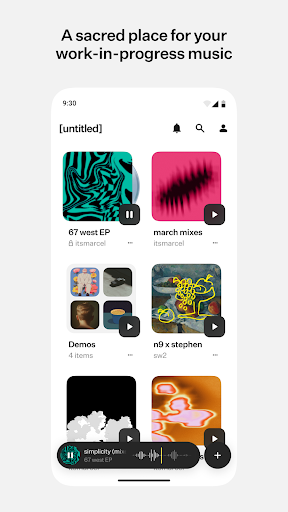
Upload & organize your music
• Upload directly from your local files, Google Drive, Dropbox, or anywhere you store music.
• Organize your tracks into projects and folders, synced across your Android, web, and iOS devices.
• Manage your tracks on the go, even without an internet connection.
• Download music locally for offline playback
Sharing & Collaboration
• Share links to your music with friends & collaborators.
• See who listens and manage access to your projects.
• Perfect for collaborating on work-in-progress tracks.
• Share snippets of your tracks with others via TikTok, Instagram, and other favorite sharing apps
Secure & Reliable
• We partnered with a world-class cybersecurity firm to protect your music.
Coming soon
• Edit pitch, speed, and gain on any track
• Record ideas instantly wherever you are
• Split any track into stems with AI
How to Download [untitled] APK
- Enter the package name
stream.untitledon the APK Downloader homepage. - Select your device architecture (ARM64 recommended for modern devices).
- Click Download to get the merged APK file.
- Transfer and install the APK on your Android device.
- Keep Updated: Visit APK Downloader regularly to search for and download the latest secure versions of your favorite apps.
Security & Signature Verification
This APK download is 100% safe. We verify that the cryptographic signature of the file matches the official developer credentials. No modifications or adware are injected.