
下载来源
Device Configuration
Split APKs Installation Guide
某些应用以 Split APKs(打包在一起的多个 .apk 文件)形式分发以优化资源。标准的 Android 安装程序无法打开它们。




新版变化
- Bug fixes and performance improvements.
We hope you're loving Smart CSV. Tell us what you think by leaving a review! :)
关于此应用
More than a basic csv reader, it's your comprehensive CSV file explorer. Uncover all this with Smart CSV Viewer:
- Easy to view your CSV file.
- Use AI Assistant to query CSV content.
- Show column image URL as an image.
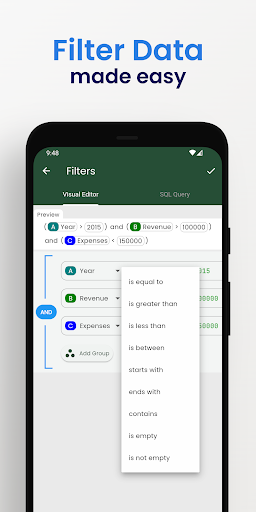
- Analyzing your data is easy by using visual filters or SQL queries.
- Easy filter data with Visual Filter Editor.
- Generate a chart image.
- Convert to PDF file. A CSV file can be custom data and style to export to a pdf file as you want.
- Manage all the exported files and share them with your friends.
- Easy to search your content.
- Copy the selected rows.
- Support both csv & tsv file format.
- Files open instantly after import, even those of large size.
- and more.
# FAQ
- Q: What is csv file?
- A: From wikipedia: Comma-separated values (CSV) is a text file format that uses commas to separate values, and newlines to separate records. A CSV file stores tabular data (numbers and text) in plain text, where each line of the file typically represents one data record. Each record consists of the same number of fields, and these are separated by commas in the CSV file.
---
- Q: Which chart types are supported?
- A: Currently, Smart CSV Viewer support column chart, bar chart, line chart, area chart, spline chart, scatter chart, step line chart, and step area chart.
---
- Q: What do you mean by “customizable”?
- A: In Smart CSV Viewer you can custom as much as you can. For example, when you only want to copy a part of data in a row, you can use the “filter” feature to exclude it. You can extract data by column. When you export to a pdf file, you can custom the style (color scheme) to match your expectation. More than a CSV converter tool, now you can change the look of your pdf file by styling it.
---
- Q: Why my file not being updated?
- A: If your file has been updated, you will need to re-import it. During the import process, the CSV file will be imported into the SQLite database. Consequently, you will be able to instantly view the updated file and utilize SQL queries to retrieve your data.
If you have any questions, don't hesitate to contact us:
Website: https://minimalistapps.github.io/smartcsv/
Email: imuosdev@gmail.com
We hope you are more productive with Smart CSV!
如何下载 CSV File Viewer - Smart CSV APK
- 在 APK Downloader 首页 输入应用包名
xyz.minimalistapps.smartcsv。 - 选择您的设备架构(现代设备推荐选择 ARM64)。
- 点击 下载 获取合并后的 APK 文件。
- 传输并安装 APK 到您的 Android 设备上。
- 保持更新: 定期访问 APK Downloader 以搜索并下载您最喜爱的应用的最新安全版本。
安全与签名验证
此 APK 下载 100% 安全。我们验证文件的加密签名与官方开发者的凭据相匹配。无任何修改或广告注入。