
下载来源
Device Configuration
Split APKs Installation Guide
某些应用以 Split APKs(打包在一起的多个 .apk 文件)形式分发以优化资源。标准的 Android 安装程序无法打开它们。
相关应用


新版变化
A teeny tiny release to smooth out a few bumps with our notification pop-up and rich text editor.
关于此应用
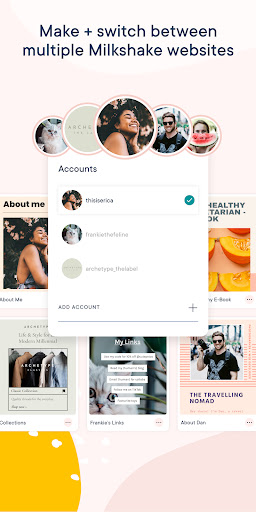
Build a website on your phone in minutes with the fun, fast, easy and free Milkshake website builder.
Milkshake websites are super easy to make and update anytime. No desktops, design or website building skills needed. All you need is your phone or tablet and the Milkshake app.
Turn your 'link in bio' into a beautiful Milkshake website to say more, sell more and share more from all social media bios, including: Instagram, TikTok and Snapchat. After all, YOLO - You Only Link Once!
The Milkshake website maker app is way easier than a drag and drop website creator. Create a Milkshake website all on your smartphone in four easy steps!
#1 Pick a Card
Cards are the pages of your Milkshake website. Visitors can swipe between each card like an Instagram Story. Each type of card has unique features for all the content you want to share or sell online.
#2 Add your content
Personalize each card with your text, images, GIFs, YouTube videos, blog posts, podcast episodes, contact details, promotions, links and more!
#3 Shake up your look
‘Shake it up’ to choose the best look for your card. Customize looks with brand colors, fonts, logos, banner images or display pictures. All look designs are beautiful, professional and mobile responsive.
#4 Publish and share
Once you’ve made your Milkshake website, publish it online for FREE. Then add your ‘link in bio’ to all social profiles, including: Instagram, TikTok and Snapchat. Plus anywhere else you want to connect your followers to your shiny new Milkshake website - easy!
Whether you're a beginner or a website pro, you can have your Milkshake website online in minutes! Create your online brand and grow your business on the go with the Milkshake website builder app.
Love stats?
Keep an eye on the performance of your Milkshake website with Insights. Track the analytics of card views, link clicks, traffic sources, top countries and new vs returning visitors in real-time to optimize your Milkshake website - for free!
You can use a Milkshake website to…
- Introduce yourself and what makes you amazing
- Share your services, products, passion projects, promotions, testimonials & social profiles
- Keep followers up to date on your latest blog posts, podcast episodes, ebooks & resources
- Promote your YouTube videos and channel to turn your followers into subscribers
- Recommend your top picks, fave buys, must-dos & must-haves
- Highlight your latest and greatest work
- Launch your new business venture
- Receive new bookings and clients
+ more coming your way!
With a subscription you can…
- Connect your custom domain to your Milkshake site
- Add a Contact Form to your site to let your followers get in touch
- Add a mailing list to your website to collect emails
- Integrate your mailing list with Google Sheets or Mailchimp
- Temporarily hide a Card from your website while you perfect your drafts
- Unlock a year's worth of Insights data
- Boost the visibility of your website to search engines with SEO Tools
- Customize your website preview for social sharing
- Create and track marketing campaigns with our campaign builder
- Add a Meta pixel and run ad campaigns
- Remove the Milkshake branding from your website
You can share a Milkshake website on...
- All your favorite social networks, including: Instagram, TikTok, Snapchat, Facebook, YouTube, Pinterest, Twitter, LinkedIn, Twitch, Tumblr, WhatsApp, Threads, Discord, Linktree and WeChat
- Business Cards, Email Signatures, Brochures, Posters, Online Profiles and Listings
- Portfolio Sites, Resumes and Media Kits
+ anywhere your followers and customers want to learn more about you!
Time to show the world what you’re made of.
Install the Free Android Milkshake App to get started!
如何下载 Milkshake — Website Builder APK
- 在 APK Downloader 首页 输入应用包名
milkshake.website.builder。 - 选择您的设备架构(现代设备推荐选择 ARM64)。
- 点击 下载 获取合并后的 APK 文件。
- 传输并安装 APK 到您的 Android 设备上。
- 保持更新: 定期访问 APK Downloader 以搜索并下载您最喜爱的应用的最新安全版本。
安全与签名验证
此 APK 下载 100% 安全。我们验证文件的加密签名与官方开发者的凭据相匹配。无任何修改或广告注入。