
下载来源
Device Configuration
Split APKs Installation Guide
某些应用以 Split APKs(打包在一起的多个 .apk 文件)形式分发以优化资源。标准的 Android 安装程序无法打开它们。
相关应用




新版变化
Bug fixes and enhancements.
关于此应用
To all USPS Mobile® app customers, we recommend downloading the updated USPS Mobile® application. This USPS Mobile® application was created to be compatible with newer Android phones. We have also fixed bugs within the app. To receive updates to your USPS Mobile® app, please download the app here.
Access popular USPS.com® tools on the go with the “USPS Mobile®” app: calculate shipping prices (limitations apply), find a Post Office ™, look up a ZIP Code™, schedule a next-day pickup, request USPS to hold your mail, access Informed Delivery® to track packages and digitally preview incoming mail, and more.
• Check the status of shipments sent using Priority Mail®, Priority Mail Express®, Certified Mail®, and certain other delivery services. Nickname your shipments and sign up for text and email alerts to notify you of the delivery status.
• Calculate a Domestic or International Price to determine how much postage you will need when you ship a letter, card, large envelope, or package (limitations apply). Choose retail or online pricing, add any extra services you need, and view the total, too.
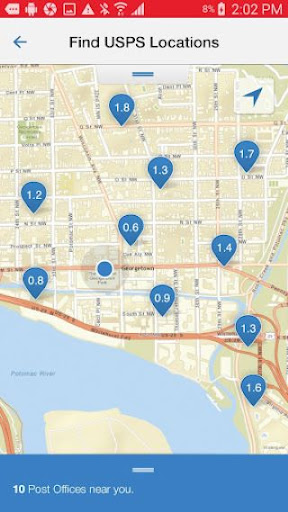
• Find USPS® Locations when you need to get to a Post Office™, Self-Service Kiosk (APC®) or collection box with an easy-to-filter locator. The USPS Mobile app uses your device’s GPS to show your closest options on a map, along with their Regular Hours, Special Hours and Last Collection Times, and provides mapped results with driving, walking, or transit directions.
• Look up a ZIP Code™ for any U.S. or Canadian address.
• Schedule a free next-day pickup and have your Letter Carrier pick up Priority Mail®, Priority Mail Express®, Global Express Guaranteed®, or Merchandise Return Services shipments from your home or office during regular mail delivery.
• Request Hold Mail Service while you’re away, and we’ll keep your mail at your local Post Office™ for you to pick up or be delivered by your carrier when you return.
• Scan the barcode on shipping labels with your device’s camera. The app recognizes the shipment and stores the label number, so you can stay on top of delivery status.
• Link to Informed Delivery to track packages and digitally preview your household’s incoming mail arriving soon; view grayscale images of the exterior, address side of letter-sized mailpieces.
如何下载 USPS MOBILE® APK
- 在 APK Downloader 首页 输入应用包名
com.usps.app。 - 选择您的设备架构(现代设备推荐选择 ARM64)。
- 点击 下载 获取合并后的 APK 文件。
- 传输并安装 APK 到您的 Android 设备上。
- 保持更新: 定期访问 APK Downloader 以搜索并下载您最喜爱的应用的最新安全版本。
安全与签名验证
此 APK 下载 100% 安全。我们验证文件的加密签名与官方开发者的凭据相匹配。无任何修改或广告注入。