
下载来源
Device Configuration
Split APKs Installation Guide
某些应用以 Split APKs(打包在一起的多个 .apk 文件)形式分发以优化资源。标准的 Android 安装程序无法打开它们。
相关应用






新版变化
Fix issues and improve the user experience.
关于此应用
Tired of disorganized paper notes, inefficient PDF reading, and missing key points in classes? Kilonotes is an all-in-one digital note-taking solution for students and professionals. Besides natural handwritten input, PDF annotation, image and video insertion, it features a powerful built-in AI Assistant to help you record, learn and review more efficiently. Whether it’s taking class notes, learning online courses, extracting reading key points or organizing knowledge, Kilonotes is your perfect paperless companion to boost study and work efficiency.
📝 Natural Handwriting, Beyond Paper Limits
• Natural handwriting experience with smooth and clear strokes
• Multiple brush effects: ballpoint pen, fountain pen, paintbrush and more
• Freely move, zoom and rotate handwritten content for flexible editing
• Undo/redo and adjustable eraser size for effortless writing
• Unlimited virtual paper, no limits to your notes
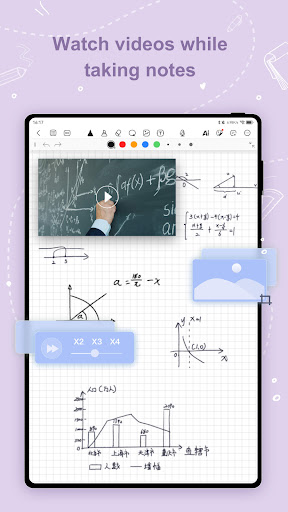
• Insert images and record audio, never miss key points while listening
• Flashcard feature to build your personalized knowledge base quickly
• OCR text extraction, convert images to editable text efficiently
• Global quick browse, locate needed content with one click
🧠 AI Assistant, Boost Your Efficiency
• AI Q&A & Chat: Chat with AI anytime to ask about note key points, generate mind maps, outline essays and get intelligent content interpretation
• AI Problem Solving: Snap or type in questions, AI provides instant explanations and solutions, conquer math, physics and chemistry problems, say goodbye to blind practice
📖 Professional PDF Reading & Annotation
• Global PDF search, find literature content quickly
• Outline navigation and page jump for efficient reading
• Multiple reading modes: Eye Protection, Dark Mode, Vision Care
• Foreign literature translation and key point extraction, study without barriers
• Flexible PDF annotation extension, seamless reading and writing
🎨 Professional Brushes, Create Freely
• Custom brush colors and color picker tool
• Adjustable brush width for writing, marking and drawing scenarios
• Rich brush strokes with doodle pen, make your notes vivid and beautiful
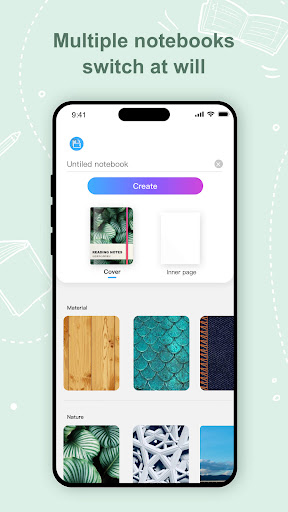
📒 Customizable Notebooks
• Abundant notebook covers and paper templates: blank, dot grid, square grid, Cornell and more
• Built-in exquisite sticker resources for aesthetic notes and digital bullet journals
• Import PDFs directly and take notes freely in your personalized notebooks
• Build a consistent and personalized learning knowledge base
For suggestions or questions, feel free to contact us:
business@top-stack.com
About Subscription
Pricing may vary by region. Subscription fees will be deducted from your Google Play account-bound credit card. Paid accounts will auto-renew upon expiration. You may cancel auto-renewal at least 24 hours before the end of the current billing period. Subscriptions cannot be cancelled or refunded unless stated otherwise in the Kilonotes Terms of Service. Manage your subscription in your Account Settings after purchase.
Official website: https://www.kilonotesapp.com
Privacy Policy: https://www.top-stack.com/page/Kilonotes_Privacy_Policy_En.html
Terms of Service: https://www.top-stack.com/page/Kilonotes_Terms_of_use_En.html
如何下载 Kilonotes-Notes & Mark up PDF APK
- 在 APK Downloader 首页 输入应用包名
com.topstack.kilonotes.pad。 - 选择您的设备架构(现代设备推荐选择 ARM64)。
- 点击 下载 获取合并后的 APK 文件。
- 传输并安装 APK 到您的 Android 设备上。
- 保持更新: 定期访问 APK Downloader 以搜索并下载您最喜爱的应用的最新安全版本。
安全与签名验证
此 APK 下载 100% 安全。我们验证文件的加密签名与官方开发者的凭据相匹配。无任何修改或广告注入。