
下载来源
Device Configuration
Split APKs Installation Guide
某些应用以 Split APKs(打包在一起的多个 .apk 文件)形式分发以优化资源。标准的 Android 安装程序无法打开它们。
相关应用




新版变化
- Get Emoji suggestions while typing 🔥
- Save WhatsApp status by swiping up 💾
- Save stickers to your favorites 📌
关于此应用
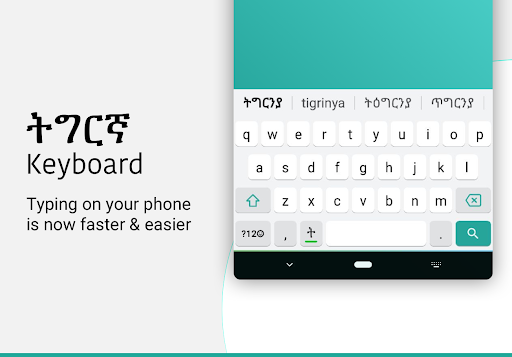
Tigrinya Keyboard lets you type in English characters which gets instantly converted to Tigrinya.
Typing with this Tigrinya keyboard is the fastest way to type - you don't need any other Tigrinya input tools. It works inside all applications on your phone - no more copy-paste! Supports 21+ colorful themes with easy settings, this is the trendiest way to type Tigrinya letters on Android, and the easiest Tigrinya typing keyboard!
Chat with your friends and family in your native language - use native Tigrinya text on Whatsapp, Facebook or any other app on your phone like a regular keyboard.
How to start Tigrinya typing using this Tigrinya Keyboard:
1. Open Tigrinya Keyboard from your apps after installing
2. Enable and choose Tigrinya Keyboard as your default keyboard.
3. Customize settings and choose from 21 amazing themes
4. Start typing Tigrinya language everywhere!
Start typing in English and choose Tigrinya word suggestions for what you're typing. Offline support coming soon. Works on Android phones and Android tablets. Simple to use with touch screen Tigrinya text typing from phonetic transliteration using this keyboard.
- Tigrinya keypad, Tigrinya layout and Tigrinya mobile keyboard in all your applications
- Easy swith to English or Tigrinya text as you need. Turn off Tigrinya when you don't need by using the language button.
- Emoji's are supported: hold on the 123 number button and you'll get a list of smileys. There are 3 pages from which you can choose what you need from the Tigrinya smiley keyboard..
- Color themes can be changed from the settings page. Look for Tigrinya keyboard in your apps to access this.
- Easily search and open apps installed on your phone and discover new apps relevant to you with our App Search feature.
No more typing with slow manual keyboards - this is the best Android Tigrinya Transliteration Keyboard that is free, fast, effortless and easy to use.
No personal information or credit card details are collected. We store anonymous statistics may be shared to improve your experience - share your suggestions at apps@clusterdev.com
Please leave great feedback - it helps us keep going!
如何下载 Tigrinya Keyboard APK
- 在 APK Downloader 首页 输入应用包名
com.tigrinya.keyboard.for.android。 - 选择您的设备架构(现代设备推荐选择 ARM64)。
- 点击 下载 获取合并后的 APK 文件。
- 传输并安装 APK 到您的 Android 设备上。
- 保持更新: 定期访问 APK Downloader 以搜索并下载您最喜爱的应用的最新安全版本。
安全与签名验证
此 APK 下载 100% 安全。我们验证文件的加密签名与官方开发者的凭据相匹配。无任何修改或广告注入。