
下载来源
Device Configuration
Split APKs Installation Guide
某些应用以 Split APKs(打包在一起的多个 .apk 文件)形式分发以优化资源。标准的 Android 安装程序无法打开它们。
相关应用




新版变化
- Minor UI improvements
关于此应用
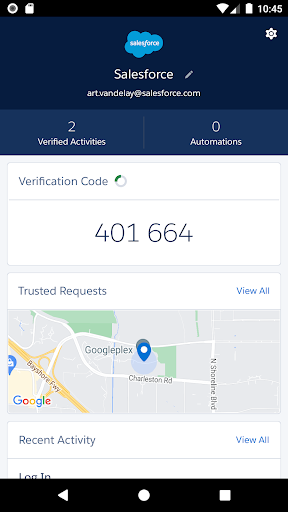
Salesforce Authenticator adds an extra layer of security for your online accounts with multi-factor authentication (also known as two-factor authentication). With Salesforce Authenticator, you use your mobile device to verify your identity when logging in to your account or performing critical actions. The app sends you a push notification, and you approve or deny the activity with just a tap. For even more convenience, Salesforce Authenticator can use your mobile device’s location services to automatically approve account activity that you trust. The app also provides one-time verification codes for use while you’re offline or have low connectivity.
Use Salesforce Authenticator to secure all your online accounts that support time-based one-time passwords (TOTP). Any service that allows multi-factor authentication using an “Authenticator app” is compatible with Salesforce Authenticator.
Location Data & Privacy
If you enable location-based automation in Salesforce Authenticator, location data is stored securely on your mobile device and not in the cloud. You can delete all location data from your device or turn off location services at any time. Learn more about how the app uses location data in Salesforce Help.
Battery Usage
Rather than getting precise location updates, Salesforce Authenticator only receives updates when you enter or leave the approximate area, or “geofence,” of a location that you trust. By minimizing the frequency of location updates, Salesforce Authenticator conserves your mobile device’s battery life. To reduce battery usage even more, you can turn off location services and stop automating your activity.
如何下载 Salesforce Authenticator APK
- 在 APK Downloader 首页 输入应用包名
com.salesforce.authenticator。 - 选择您的设备架构(现代设备推荐选择 ARM64)。
- 点击 下载 获取合并后的 APK 文件。
- 传输并安装 APK 到您的 Android 设备上。
- 保持更新: 定期访问 APK Downloader 以搜索并下载您最喜爱的应用的最新安全版本。
安全与签名验证
此 APK 下载 100% 安全。我们验证文件的加密签名与官方开发者的凭据相匹配。无任何修改或广告注入。