
下载来源
Device Configuration
Split APKs Installation Guide
某些应用以 Split APKs(打包在一起的多个 .apk 文件)形式分发以优化资源。标准的 Android 安装程序无法打开它们。
相关应用




新版变化
v11.3
1.Fixed the issue where the wallpaper is not applied after applying theme
2.Optimized the setting page icons
3.Fixed the issue where the icons are not applied after applying theme
关于此应用
Newer Launcher(original name New Launcher) -- 2026 themes, icon packs, wallpapers, it has many enhanced launcher features; Newer Launcher provide you not only the latest Android™ native launcher experience, but also a much more powerful ,feature-rich & cool launcher experience.
Notes:
- Android is a trademark of Google Inc.
- New Launcher is not official Android 13 Launcher or Android 16 launcher, it is an enhancement of native latest Android launcher with many value-added features.
⭐⭐⭐⭐⭐ New Launcher main features:
- Android™ 13 and Android 16 launcher style, available for almost ALL Android 5.0+ devices
- Android native launcher experience, yet with many enhanced handy launcher features
- 5000+ launcher themes and icon pack
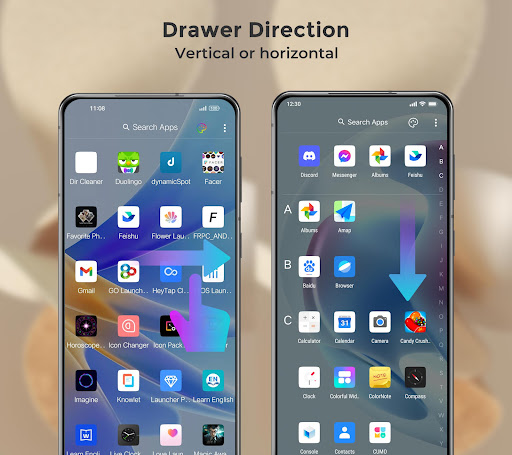
- Vertical drawer or Horizontal drawer are supported, you have the choice
- Two app drawer style:All apps sectioned by alphabet or just compact style
- Widgets drawer: Widgets classified by apps in launcher widgets drawer
- Hide app, even lock hidden app, protect your privacy
- Unread counts for missed call and unread SMS
- Gestures: double tap, swipe up/down, pinch in/out, and two fingers gestures
- A-Z fast app scroller in Launcher Drawer, help you find and open app quickly
- Lock launcher desktop layout option, never miss up
- Drawer background color option
- Search bar style configuration
- Launcher wallpaper scrolling option
- Icon size, label size/color option
- Launcher grid size option
- Support cool Android style circle animation
- Drawer background option: light card, dark card, no card
- Geometry wallpapers
- 3D parallax wallpapers
⭐⭐⭐⭐⭐ We are trying our best to build New Launcher 2026 - theme, icon pack, wallpaper better and better, please try this new 2026 launcher versions, your rating and comments are encouraging to us, thanks a lot.
如何下载 Newer Launcher 2026 launcher APK
- 在 APK Downloader 首页 输入应用包名
com.nu.launcher。 - 选择您的设备架构(现代设备推荐选择 ARM64)。
- 点击 下载 获取合并后的 APK 文件。
- 传输并安装 APK 到您的 Android 设备上。
- 保持更新: 定期访问 APK Downloader 以搜索并下载您最喜爱的应用的最新安全版本。
安全与签名验证
此 APK 下载 100% 安全。我们验证文件的加密签名与官方开发者的凭据相匹配。无任何修改或广告注入。