
下载来源
Device Configuration
Split APKs Installation Guide
某些应用以 Split APKs(打包在一起的多个 .apk 文件)形式分发以优化资源。标准的 Android 安装程序无法打开它们。
相关应用




新版变化
Thank you for using File Manager. Here's what we've done in the new version:
1. Fixed some known bugs.
2. Boosted overall performance.
关于此应用
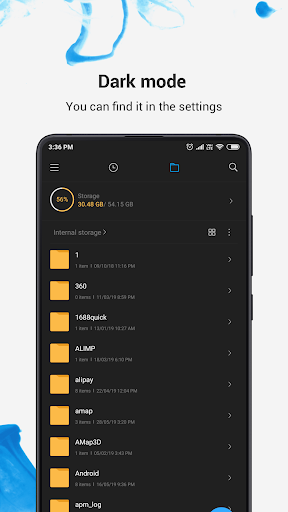
Mi File Manager is a free, secure tool that helps you find file faster, manage files easily, and share them offline with others. It supports tons of cool features: quick search, moving, deleting, opening, and sharing files, as well as renaming, unzipping, and copy-paste. Mi File Manager also recognizes multiple file formats, including music, videos, images, documents, APKs, and zip-files. We update our app regularly to bring you the best experience. With Mi File Manager’s crisp and clear UI, file management becomes easier than ever before!
Key features
Recent: View the files you worked with recently without looking for them.
Categories: Files are organized into categories by their formats. From there, you can access to frequently used apps quickly.
Storage: View your storage stats and manage all folders on your device.
Cleaner: Free up storage space on your device by deleting cache and junk files.
Mi Drop: Share files with friends who are nearby without connecting to the Internet.
Global search: Enter keywords to find files.
Multiple file formats support: Open videos, music, documents, APKs, and compressed files with one tap.
File compression: Compress and decompress ZIP/RAR archives.
Manage multiple files: Select multiple files for the same operation.
Multiple languages supported: Bahasa Indonesia, Bengali, Chinese, English, Español, Português, ру́сский язы́к, українська мова, Tiếng Việt
如何下载 File Manager APK
- 在 APK Downloader 首页 输入应用包名
com.mi.android.globalFileexplorer。 - 选择您的设备架构(现代设备推荐选择 ARM64)。
- 点击 下载 获取合并后的 APK 文件。
- 传输并安装 APK 到您的 Android 设备上。
- 保持更新: 定期访问 APK Downloader 以搜索并下载您最喜爱的应用的最新安全版本。
安全与签名验证
此 APK 下载 100% 安全。我们验证文件的加密签名与官方开发者的凭据相匹配。无任何修改或广告注入。