
下载来源
Split APKs Installation Guide
某些应用以 Split APKs(打包在一起的多个 .apk 文件)形式分发以优化资源。标准的 Android 安装程序无法打开它们。
1.
Download Split APKs Installer (SAI) from Google Play Store.
2.
Download the app archive (.apks) using the download sources listed above.
3.
Open SAI, click "Install APKs", choose the downloaded archive, and click Install.
相关应用


版本
4.4.1
下载次数
5,000,000+
更新日期
May 30, 2026
开发者
HLCSDev
类别
Productivity
内容分级
Everyone
包名
com.hlcsdev.x.notepad
Platform
Android



新版变化
Word and character counter
关于此应用
Features
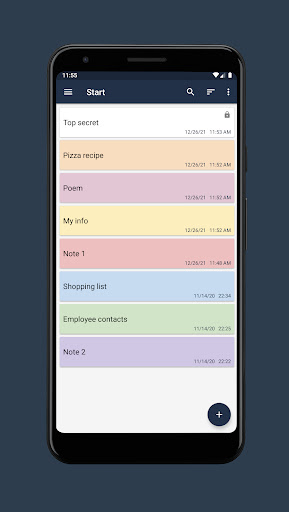
• Create folders.
• Create notes in folders.
• Search for notes in notepad.
• Sort the list of notes.
• Highlighting notes in color.
• Setting a password for individual notes.
• Change the font size in the note window.
• Export notes to file (txt, pdf).
• Ability to share a note from a notepad.
• Highlighting URL links, email addresses and phone numbers with the ability to navigate through them.
• Dark theme.
• Autosave.
• Create a backup copy of your notepad.
• Restoring a notepad from a backup.
如何下载 Notepad Notes APK
- 在 APK Downloader 首页 输入应用包名
com.hlcsdev.x.notepad。 - 选择您的设备架构(现代设备推荐选择 ARM64)。
- 点击 下载 获取合并后的 APK 文件。
- 传输并安装 APK 到您的 Android 设备上。
- 保持更新: 定期访问 APK Downloader 以搜索并下载您最喜爱的应用的最新安全版本。
安全与签名验证
此 APK 下载 100% 安全。我们验证文件的加密签名与官方开发者的凭据相匹配。无任何修改或广告注入。