
下载来源
Device Configuration
Split APKs Installation Guide
某些应用以 Split APKs(打包在一起的多个 .apk 文件)形式分发以优化资源。标准的 Android 安装程序无法打开它们。




新版变化
• Maintenance release targeting the latest versions of Android
• Fix issue where orientation would stay locked after turning off profile
关于此应用
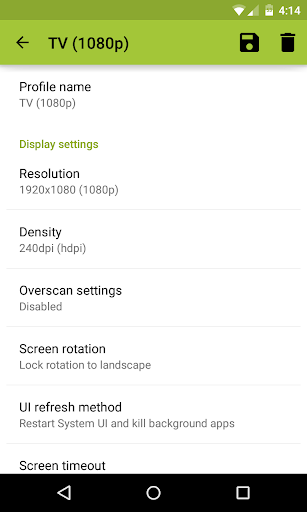
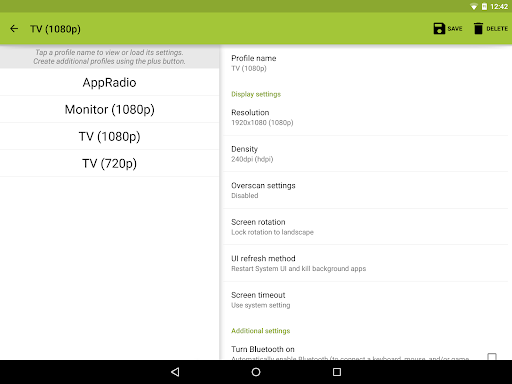
SecondScreen is an application designed for power users that frequently connect their Android devices to external displays. It works with your existing screen mirroring solution to give you the best experience possible. With SecondScreen, you can change your device's resolution and density to fit your TV or monitor, enable always-on desktop mode in Chrome, and even turn your device's backlight off, among several other features.
Featured on Pocketables, XDA-Developers, Android Police, AndroidHeadlines, Android Community, and Android Beat!
PLEASE READ BEFORE DOWNLOADING:
• This app REQUIRES elevated permissions, granted via root access or adb shell commands. The app will do nothing if you do not have a rooted device or access to adb.
• This app is ONLY for devices with AOSP / Google experience ROMs. It is not guaranteed to function properly on devices with manufacturer-skinned ROMs.
• This app does not provide screen mirroring capabilities on its own. Screen mirroring may require either an MHL/SlimPort adapter or a wireless solution such as Miracast or Chromecast.
• A Bluetooth keyboard and mouse is strongly recommended as the app can make UI elements smaller and harder to press on the device itself.
Features:
• Easily change resolution and density (DPI) - take full advantage of the resolution of your external display, and show the Android tablet interface if you're using a phone
• Simple profile-based interface - easy to enable/disable different profiles for different types of displays
• Many configurable options, including:
• Automatically enable Bluetooth and Wi-Fi - quickly connect a keyboard, mouse, and/or game controller
• Automatically enable Daydreams
• Show desktop sites in Chrome by default - browse the real Web, on your TV!
• Lock screen orientation to landscape
• Overscan support for older TVs (Android 4.3+)
• System-wide immersive mode (Android 5.0+)
• Disable device backlight and/or vibration - save battery while your device is connected (not compatible with all devices)
• Full integration with Tasker
• Load profiles automatically when a display is connected
• Quick Actions - quickly and easily run SecondScreen features without creating or editing profiles
• Homescreen shortcuts - launch a profile with one tap, without entering the app
Explanation of permissions:
• root access or adb shell commands required to change resolution/DPI, disable backlight/vibration, enable desktop-only mode in Chrome
• "connect and disconnect from Wi-Fi", "view Wi-Fi connections" - required for profiles to enable Wi-Fi
• "access Bluetooth settings", "pair with Bluetooth devices" - required for profiles to enable Bluetooth
• "close other apps" - required to refresh the user interface after a resolution/DPI change. Ensure all data is saved before launching a profile.
• "run at startup" - required to show SecondScreen profile notification after a (soft/hard) reboot
• "modify system settings" - required for profiles to lock rotation and set brightness
This app uses the Device Administrator permission.
如何下载 SecondScreen APK
- 在 APK Downloader 首页 输入应用包名
com.farmerbb.secondscreen.free。 - 选择您的设备架构(现代设备推荐选择 ARM64)。
- 点击 下载 获取合并后的 APK 文件。
- 传输并安装 APK 到您的 Android 设备上。
- 保持更新: 定期访问 APK Downloader 以搜索并下载您最喜爱的应用的最新安全版本。
安全与签名验证
此 APK 下载 100% 安全。我们验证文件的加密签名与官方开发者的凭据相匹配。无任何修改或广告注入。