
下载来源
Device Configuration
Split APKs Installation Guide
某些应用以 Split APKs(打包在一起的多个 .apk 文件)形式分发以优化资源。标准的 Android 安装程序无法打开它们。
相关应用




新版变化
* 'Add track' in Live Performance mode could cause a crash when 16 or more tracks were present. Solved.
* Saving a project would un-arm the tracks and the arm state was therefore not stored. Solved.
* Selecting MIDI remote setup would un-arm the tracks. Solved.
* Improved memory management when switching Soundfonts.
* The volume peak calculation for the right channel of a stereo track was wrong in situations where a zero-crossing needed to be calculated. Solved.
关于此应用
From recording song ideas to full-fledged mobile productions, Audio Evolution Mobile sets the standard for music creation, mixing and editing on Android. Whether you are recording using the internal mic or recording from a multi-channel USB audio (*) or MIDI interface, Audio Evolution Mobile rivals desktop DAWs. Featuring virtual instruments, a vocal pitch and time editor, a virtual analog synthesizer, real-time effects, mixer automation, audio loops, drum pattern editing and more, the app powers your creativity.
Audio Evolution Mobile Studio was chosen the #1 Android mobile music app in Computer Music - December 2020 issue!
Note that this is a TRIAL version of the full paid version and has several limitations:
• Loading of projects is limited to 3 tracks
• Mixdown is limited to 45 seconds
• Recording and playback stops after 2 minutes (45 seconds for USB audio)
• The app will quit after 20 minutes
• The app will stop working after a while
Check out our new tutorial video series: https://www.youtube.com/watch?v=2BePLCxWnDI&list=PLD3ojanF28mZ60SQyMI7LlgD3DO_iRqYW
Features:
• Multitrack audio and MIDI recording / playback
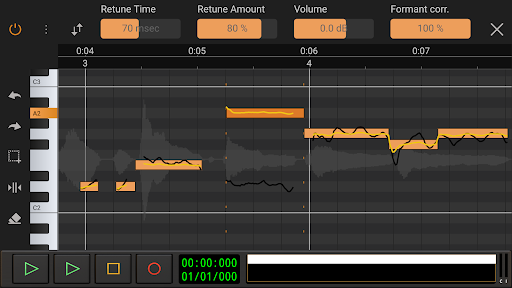
• Auto or manually tune your vocals with Vocal Tune Studio (*) : an editor to correct pitch and time of vocal recordings and the timing of any audio material. It features retune time, retune amount, volume, vibrato controls and formant correction per note.
• Virtual analog synthesizer 'Evolution One' based on the popular Synth One from AudioKit.
• Sample-based Soundfont instruments
• Drum pattern editor (including triplets and using your own audio files)
• Low latency and multichannel recording/playback using a USB audio interface (*)
• Edit audio and MIDI clips with unlimited undo/redo
• Tempo and time signature changes including gradual tempo change
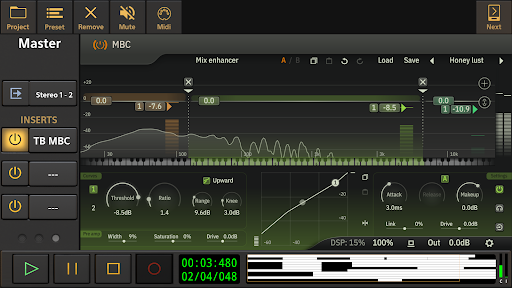
• Real-time effects including chorus, compressor, delays, EQs, reverb, noise gate, pitch shifter, vocal tune etc.
• Flexible effect routing: an unlimited number of effects can be placed on a grid, featuring parallel effect paths.
• Assign LFO's to effect parameters or lock parameters to tempo
• Sidechain on the compressor effects
• Automation of all mixer and effect parameters
• Import of many formats like WAV, MP3, AIFF, FLAC, OGG and MIDI
• Mixdown to WAV, MP3, AIFF, FLAC or OGG with share option
• Unlimited number of tracks and groups
• MIDI remote control
• Projects are interchangeable with our iOS version
• Cloud sync to Google Drive (backup or share/exchange projects with one of your other devices on Android or iOS and collaborate with friends)
In short: a complete portable multitrack digital audio workstation (DAW) that will replace your 4 track recorder or tape machine at an incredibly low price!
(*) The following optional in-app purchases are available in the full version:
• A custom developed USB audio driver that bypasses the limits of Android audio when connecting a USB audio interface/mic: low latency, high quality multi-channel recording and playback at any sample rate and resolution that the device supports (for example 24-bit/96kHz). Please see here for more information and device compatibility: https://www.extreamsd.com/index.php/technology/usb-audio-driver
Note that you are always free to try the Android USB audio driver without this in-app purchase (with the limits that come with it like high latency and 16-bit audio).
• Vocal Tune with two-voice harmonizer and Vocal Tune PRO
• Vocal Tune Studio
We also sell effects and content from other vendors at reduced prices in the full version:
• ToneBoosters Flowtones
• ToneBoosters pack 1 (Barricade, DeEsser, Gate, Reverb)
• ToneBoosters V3 EQ, Compressor, Ferox
• ToneBoosters V4 Barricade, BitJuggler, Enhancer, EQ, MBC, ReelBus, Reverb, etc.
• Loops and Soundfonts at various prices
Facebook: https://www.facebook.com/AudioEvolutionMobile
Forum: https://www.extreamsd.com/forum
User manual: https://www.audio-evolution.com/manual/android/index.html
如何下载 Audio Evolution Mobile TRIAL APK
- 在 APK Downloader 首页 输入应用包名
com.extreamsd.aemobiledemo。 - 选择您的设备架构(现代设备推荐选择 ARM64)。
- 点击 下载 获取合并后的 APK 文件。
- 传输并安装 APK 到您的 Android 设备上。
- 保持更新: 定期访问 APK Downloader 以搜索并下载您最喜爱的应用的最新安全版本。
安全与签名验证
此 APK 下载 100% 安全。我们验证文件的加密签名与官方开发者的凭据相匹配。无任何修改或广告注入。