
İndirme Kaynakları
Split APK Kurulum Kılavuzu
Bazı uygulamalar, kaynakları optimize etmek için Split APK'ler (birlikte paketlenmiş birden fazla .apk dosyası) olarak dağıtılır. Standart Android yükleyicileri bunları açamaz.
İlişkili Uygulamalar


Yenilikler
General improvements
Bu uygulama hakkında
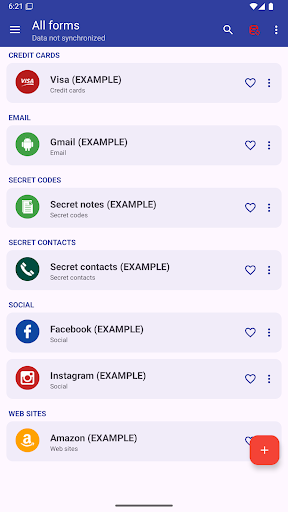
This app allows you to manage everything you need to keep secret: Password, Codes, Contacts, etc.
AES 256-bit encryption method was used, this is the most modern technology .
By automatic sync, you'll have all your passwords on all your Android devices and computer Windows, Linux and Mac.
MAIN FEATURES
➤ Access with fingerprint
➤ Sync with Google Drive and DropBox
➤ Desktop App (Windows, Mac & Linux)
➤ Password security analysis
➤ Password Generator
➤ Advanced search function
➤ Change app colors
➤ Automatic restore
➤ Auto lock
➤ Add your own custom icons
➤ Attach pictures and photographs, they will be encrypted and will be visible only within the application
➤ Add new categories
➤ Add new fields
➤ Creates PDF files with stored data to print on paper
➤ Material design
➤ Wear OS version
..and many more
AUTOMATIC SYNC:
Automatic synchronization lets you always have a backup of your passwords on a Cloud (
Also, with the same account, you can see your passwords in real time on all of your Android devices and Windows, Mac & Linux
ACCESS WITH FINGERPRINT:
Fingerprint access is an additional security method if you have a fingerprint and if your phone is compatible.
PASSWORD GENERATOR AND SECURITY ANALYSIS:
Within the app, a password generator is available, indicating the password security level. Also with the password generator you can check the password security you already have.
CUSTOM ICONS:
When you save a new password or other, you have the choice of over 110 icons, or easily insert your custom icon, which you can select from your phone's gallery or take a photo directly.
---------------------------------------------------------
Link to download the desktop version: https://www.2clab.it/passwordcloud
Password Manager APK Nasıl İndirilir
- Paket adını
password.cloudAPK Downloader ana sayfasında girin. - Cihazınızın mimarisini seçin (modern cihazlar için ARM64 önerilir).
- Birleştirilmiş APK dosyasını almak için İndir'e tıklayın.
- APK'yı Android cihazınıza aktarın ve yükleyin.
- Güncel Kalın: En sevdiğiniz uygulamaların en son güvenli sürümlerini aramak ve indirmek için düzenli olarak APK Downloader'ı ziyaret edin.
Güvenlik ve İmza Doğrulaması
Bu APK indirmesi %100 güvenlidir. Dosyanın kriptografik imzasının resmi geliştirici sertifikasıyla eşleştiğini doğrularız. Herhangi bir değişiklik veya reklam barındırmaz.