
İndirme Kaynakları
Device Configuration
Split APK Kurulum Kılavuzu
Bazı uygulamalar, kaynakları optimize etmek için Split APK'ler (birlikte paketlenmiş birden fazla .apk dosyası) olarak dağıtılır. Standart Android yükleyicileri bunları açamaz.
İlişkili Uygulamalar




Yenilikler
• Added automatic app categorization.
• Fixed the issue where the screen froze during the first launch.
Tips: Please avoid joining the testing program casually unless you’re ready to explore unfinished features. Unlike v2, v3 is not a continuation, but a fresh new beginning. Make sure to back up your current home screen layout, the backup function is already provided.
Bu uygulama hakkında
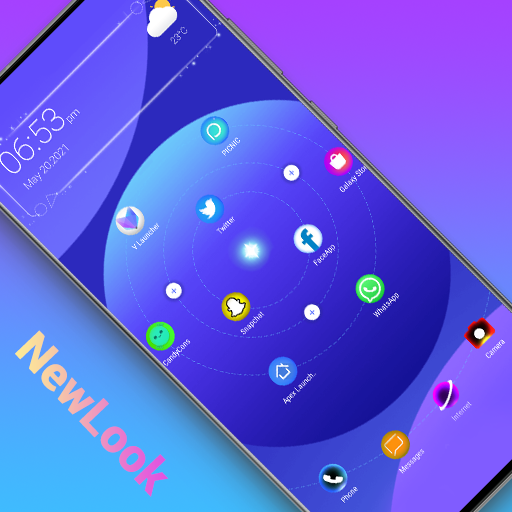
A flexible multi-style home screen replacement that helps personalize your device with a variety of configurations.
▌ Key Features
🧬 DNA your Launcher
Classic style ‧ layout with horizontal scrolling pages.
Minimalism ‧ One-handed friendly, alphabetical index based on native language.
Holographic mode ‧ A touchable holographic 3D spin that fits the watch.
✨ Personalization
Easy to customize layout, icon packs & shape & size, fonts and wallpaper. Your launcher should be as unique as your DNA.
🔍 Smart Search
Suggestions, voice assistant, recent results.
Supports searching app or contacts and define your internet search engines (Google, DuckDuckGo, Bing, Baidu, etc.)
🔒 Protect your privacy
Hide or lock apps for free!
Lock folders to keep your secrets safe.
📂 App Navigation
DNA Launcher provides an App Drawer and App Library to help you access all your apps instantly.
As a traditional alphabetic-indexing user interface, the App Drawer presents apps in various forms (only icon or label, both vertically/horizontally) depending on your preference.
Not in the mood to use the App Drawer? Use the App Library instead, which organizes apps by category and sorts apps automatically by frequency of use.
👋🏻 Custom Gestures
Not in the mood to use either the App Drawer or App Library? No problem, DNA Launcher has you covered.
There are many custom gesture actions like double-tap, swipe down/up/left/right, and corresponding events or applet layout (including opening App Drawer/App Library, etc.) for you to choose in the launcher settings.
🎨 Effects and Animations
Real-time blurring Dock (No worry of performance impacts and memory consumption, achieved in the most efficient way possible).
Sleek folder opening animation.
App start/close animation.
Day/Night Mode.
▌ Helpful Tips
• Edit home screen: long press and drag an icon, before dropping it, you can use another finger to tap other icons or widgets to edit them together.
• Hiding pages: Got Tinder on your home page? Just hide the page by long-pressing the scroll bar if you're not single, but honesty is the best policy.
• Switch launcher style: Select your favorite style to apply in launcher settings.
• Lock screen: Double-tap (or other gestures you prefer) to lock your phone instantly, always free.
• Protect privacy: Lock secret apps, folders, or even a folder within a folder.
If you 💗 DNA Launcher, please support us with a 5-star rating ⭐️⭐️⭐️⭐️⭐️! If you dislike it, please let us know why. We're eager to hear your voice.
Twitter: https://x.com/DNA_Launcher
Youtube: https://www.youtube.com/@AtlantisUltraStation
Reddit: https://www.reddit.com/r/DNALauncher
Email: atlantis.lee.dna@gmail.com
▌ Permissions Notice
Why does DNA Launcher offer an accessibility service? The accessibility service is only used to support access to the lock screen via customized gestures. The service is optional, disabled by default, and no personal or sensitive data is collected via Accessibility Service.
Make peace, no war!
DNA Launcher ‧ Home Screen APK Nasıl İndirilir
- Paket adını
com.atlantis.launcherAPK Downloader ana sayfasında girin. - Cihazınızın mimarisini seçin (modern cihazlar için ARM64 önerilir).
- Birleştirilmiş APK dosyasını almak için İndir'e tıklayın.
- APK'yı Android cihazınıza aktarın ve yükleyin.
- Güncel Kalın: En sevdiğiniz uygulamaların en son güvenli sürümlerini aramak ve indirmek için düzenli olarak APK Downloader'ı ziyaret edin.
Güvenlik ve İmza Doğrulaması
Bu APK indirmesi %100 güvenlidir. Dosyanın kriptografik imzasının resmi geliştirici sertifikasıyla eşleştiğini doğrularız. Herhangi bir değişiklik veya reklam barındırmaz.