
Источники загрузки
Device Configuration
Руководство по установке Split APK
Некоторые приложения распространяются в виде Split APK (несколько упакованных вместе файлов .apk) для оптимизации ресурсов. Стандартные установщики Android не могут их открыть.
Похожие Приложения




Что нового
Latest Updates:
We made some changes to make things run smoothly.
Just download or update the app! Collect Stars however you pay and enjoy FREE drinks, food and more!
О приложении
Get the best of Starbucks® Rewards right at your fingertips. The Starbucks® Indonesia app is a convenient way to get better deals, order ahead and be handsomely rewarded for being a member. Rewards are mainly converted from your collected Stars to earn free food and beverages on your purchases.
Earn Stars However You Pay
Join Starbucks® Rewards and unlock exclusive benefits while earning Stars with every purchase.
Earn 1 Star for every Rp.6.000, - spent with your Starbucks Card balance, or 1 Star for every Rp.12,000, - spent using other method of payment (debit / credit / cash / etc.). Earn Stars even quicker with Double Star Days, Bonus Star programs and unique Member offers.
Track your Stars Conversion & Rewards
Collect your Stars, select, and redeem your preferred Rewards of free drinks, food and more. Starbucks® Rewards members can now also track converted Stars and redeemed Rewards in the app.
Be the first to be Informed on anything Starbucks Indonesia
Explore the app with updated news, highlights, and promotions available in Starbucks Indonesia.
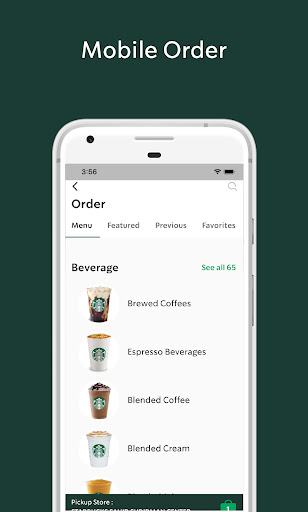
Mobile Order & Pay
The Starbucks Indonesia app provides you with a faster, easier and convenient way to seamlessly order ahead, pay and customize your favorites for pickup in our selected participating stores without waiting in line.
With Mobile Order & Pay you are now also able to earn and collect Stars for every purchase and redeem special offers, food, and beverages with your Rewards.
Manage Starbucks Cards
Check your Starbucks Card balance; add money with the online Top-Up feature in the app, view past purchases, add / remove card designs in your account.
Seamless Top Up
Top-Up or reload your card balance online using a Virtual Account with selected m-banking services. Static VA is currently available for m-BCA users for a better reload experience, where at any time, you can Top-Up directly and seamlessly from the mobile banking app without going through the Top-Up process in our Starbucks Indonesia app.
Find a Store
See stores near you, get directions, hours, and view store amenities before you make the trip.
Refer a Friend
Share the joy and benefits with your friends that have not joined the Starbucks® Rewards membership program. Copy your referral code from your profile, share it with a friend, fill in the referral code box in the registration page, and get rewards for every successful referral. The more you share, the more rewards you get!
Как скачать APK Starbucks Indonesia
- Введите имя пакета
com.starbucks.idна главной странице APK Downloader. - Выберите архитектуру вашего устройства (для современных устройств рекомендуется ARM64).
- Нажмите Скачать, чтобы получить объединенный файл APK.
- Перенесите и установите APK на свое устройство Android.
- Следите за обновлениями: Регулярно посещайте APK Downloader, чтобы искать и скачивать последние безопасные версии ваших любимых приложений.
Безопасность и проверка подписи
Эта загрузка APK на 100% безопасна. Мы проверяем соответствие цифровой подписи файла официальным ключам разработчика. Изменения и реклама отсутствуют.