
Источники загрузки
Руководство по установке Split APK
Некоторые приложения распространяются в виде Split APK (несколько упакованных вместе файлов .apk) для оптимизации ресурсов. Стандартные установщики Android не могут их открыть.
Похожие Приложения




Что нового
- You can now change note text color.
- We’ve fixed some bugs and made the app run smoother for everyone.
О приложении
Use Post-it® Notes anywhere and anytime. Post-it® App brings the simplicity of Post-it® Notes to your smartphone, tablet and Chromebook. Whether you use Post-it® Notes for teamwork and collaboration, or for reminders and personal note taking, Post-it® App helps you keep the momentum going.
If you work from home or as a student in remote learning, use the Post-it® App to share your ideas with co-workers, structure your assignments and share them with your teacher, or create colorful calendars and share them with your friends.
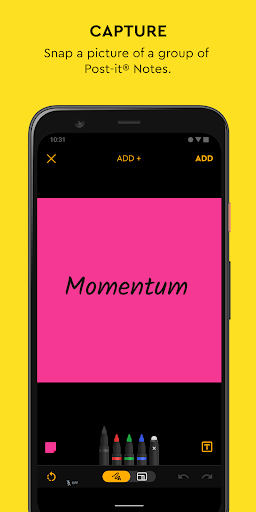
Simply capture analog notes with your camera or create digital notes right on your device. Arrange, refine and organize ideas anyway you see fit. Collaborate and share notes with co-workers, teachers and friends, or export to your favorite apps and cloud services—including Miro, Trello, Dropbox, PowerPoint, Excel, PDF, and more.
Post-it® App features:
• Connect and share ideas from anywhere with co-workers and friends, whether it be a workshop or you simply want to share notes with each other.
• Capture more than 200 Post-it® Notes at a time with your camera. All our popular note sizes are supported.
• Transcribe your notes automatically using Handwriting Recognition. Great for search and exports.
• Draw, erase, type and change the color of your notes using powerful editing tools.
• Organize your way—group your ideas by thought or simply organize on a grid.
• Share to your favorite formats and cloud services to continue working on your ideas digitally—supports Miro, Trello, Dropbox, PowerPoint, Excel, PDF, and more.
• Use our Widget to put your most important notes directly on your home screen.
Learn more about Post-it® App at post-it.com/app
Terms of Service: https://www.post-it.com/3M/en_US/post-it/ideas/app/eula/
Как скачать APK Post-it®
- Введите имя пакета
com.mmm.postitна главной странице APK Downloader. - Выберите архитектуру вашего устройства (для современных устройств рекомендуется ARM64).
- Нажмите Скачать, чтобы получить объединенный файл APK.
- Перенесите и установите APK на свое устройство Android.
- Следите за обновлениями: Регулярно посещайте APK Downloader, чтобы искать и скачивать последние безопасные версии ваших любимых приложений.
Безопасность и проверка подписи
Эта загрузка APK на 100% безопасна. Мы проверяем соответствие цифровой подписи файла официальным ключам разработчика. Изменения и реклама отсутствуют.