
Источники загрузки
Device Configuration
Руководство по установке Split APK
Некоторые приложения распространяются в виде Split APK (несколько упакованных вместе файлов .apk) для оптимизации ресурсов. Стандартные установщики Android не могут их открыть.
Похожие Приложения




Что нового
You can now display your media files on a Chromecast receiver or TV from a compatible device. Look for a Cast icon showing in the top toolbar. We hope you enjoy this top-requested feature!
О приложении
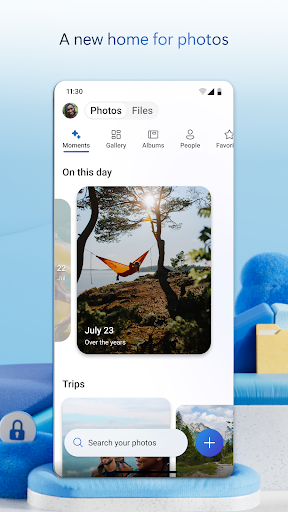
Start with 5 GB of free storage, or upgrade to Microsoft 365 Personal or Family for 1 TB per user. Access your files anywhere—even offline.
Back Up Photos & Videos
• Turn on Camera Upload for automatic photo and video backup
• Secure photo locker with automatic tagging
• View and share photos across devices
• Keep photos and videos safe with encrypted storage
File sharing and access
• Secure photo storage for all your photos, videos & albums
• Share files, photos, videos & albums with friends & family
• Access selected files offline
• Share photos & upload videos easily
• Get notifications when a shared document is edited
• Secure folder settings offer password-protected or expiring sharing links*
• Access selected OneDrive files on the app without being online
Security
• Files encrypted at rest and in transit
• Personal Vault adds identity‑verified protection
• Version history restores previous file versions
• Ransomware detection and recovery*
Collaboration with Microsoft
• Share files across platforms & share photos in the photo locker
• Use Microsoft Office apps to edit & collaborate in real time on Word, Excel, PowerPoint & OneNote files stored in OneDrive
• Back up, view & save Office documents
Document scanning
• Scan, sign, markup & send docs right from the OneDrive mobile app
• Keep documents safe in a secure folder
Search
• Search photos by what’s in them (i.e. beach, snow, etc.)
• Search docs by name or content
AI Assistance with Copilot*
• Summarize documents and extract key details quickly.
• Organize files and suggest the best way to structure your folders.
• Get intelligent recommendations for sharing and collaboration.
*Unlock the full Microsoft 365 experience with a qualifying Microsoft 365 subscription for your phone, tablet, PC and Mac.
The OneDrive app for Android offers 5 GB of free cloud storage to sync photos and files across your devices, share photos and docs, and keep your digital life backed up in the cloud.
Microsoft 365 Personal & Family Subscription
• Starts at $6.99/month in the U.S.; pricing varies by region
• 1 TB per person for up to 6 people (Family plan)
• Premium sharing links, ransomware detection, and File Restore (up to 30 days)
• Share up to 10x more content daily
• Access premium versions of Office apps and OneDrive features
Subscriptions purchased in‑app are billed to your Google Play account and renew automatically unless disabled in settings. Subscriptions can't be canceled or refunded during the active period.
Work or school sign‑in requires a qualifying OneDrive, SharePoint Online, or Microsoft 365 Business subscription.
Privacy policy: http://go.microsoft.com/fwlink/p/?LinkId=253457
Consumer health privacy policy: https://go.microsoft.com/fwlink/?linkid=2259814
Как скачать APK Microsoft OneDrive
- Введите имя пакета
com.microsoft.skydriveна главной странице APK Downloader. - Выберите архитектуру вашего устройства (для современных устройств рекомендуется ARM64).
- Нажмите Скачать, чтобы получить объединенный файл APK.
- Перенесите и установите APK на свое устройство Android.
- Следите за обновлениями: Регулярно посещайте APK Downloader, чтобы искать и скачивать последние безопасные версии ваших любимых приложений.
Безопасность и проверка подписи
Эта загрузка APK на 100% безопасна. Мы проверяем соответствие цифровой подписи файла официальным ключам разработчика. Изменения и реклама отсутствуют.