
Источники загрузки
Device Configuration
Руководство по установке Split APK
Некоторые приложения распространяются в виде Split APK (несколько упакованных вместе файлов .apk) для оптимизации ресурсов. Стандартные установщики Android не могут их открыть.
Похожие Приложения




Что нового
Bug Fixes
О приложении
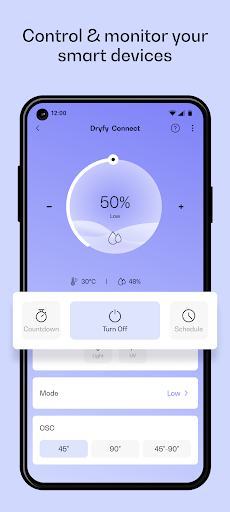
Connect smart Klarstein devices, control and monitor them remotely from everywhere in the world only through the Klarstein app.
Key features at your disposal in Klarstein App:
Connect your smart Klarstein devices in a couple of taps:
• Control and monitor your smart Klarstein devices using this app from everywhere, either from your office or travelling around the world. All you need is internet access.
• Depending on your smart device, seamlessly monitor the real-time temperature and humidity and set your desired parameter with only a few taps.
• Create different rooms in your apartment, e.g. living room, bed rooms, etc, and specify in which room your smart device is located. In this way, you can keep track of temperature and humidity in different areas of your apartment.
• Make a tour through the app with our guides! We make sure you know how to use the app and its different features.
Stay tuned with us:
• Find information about our upcoming sales.
• Stay in touch with our customer support and let us know how you like our app.
Some features may not be available for all products. We update the app regularly so you can get the most out of your products.
Send us a message: appsupport@go-bbg.com
• • •
Klarstein stands for innovative Modern Living products designed in Berlin. Klarstein's broad product range includes strong household helpers of all kinds: from kitchen appliances to home appliances to climate control products, everything is available. Through exciting colours, innovative technology and unique styles, the products of Klarstein fit seamlessly into the individual living ambience and become indispensable companions in the everyday life of our customers. At Klarstein, the slogan "time for variety" is both a claim and a guiding principle, which runs like a red thread through the entire product portfolio.
Как скачать APK Klarstein
- Введите имя пакета
com.chaltec.klarsteinrnна главной странице APK Downloader. - Выберите архитектуру вашего устройства (для современных устройств рекомендуется ARM64).
- Нажмите Скачать, чтобы получить объединенный файл APK.
- Перенесите и установите APK на свое устройство Android.
- Следите за обновлениями: Регулярно посещайте APK Downloader, чтобы искать и скачивать последние безопасные версии ваших любимых приложений.
Безопасность и проверка подписи
Эта загрузка APK на 100% безопасна. Мы проверяем соответствие цифровой подписи файла официальным ключам разработчика. Изменения и реклама отсутствуют.