
Источники загрузки
Device Configuration
Руководство по установке Split APK
Некоторые приложения распространяются в виде Split APK (несколько упакованных вместе файлов .apk) для оптимизации ресурсов. Стандартные установщики Android не могут их открыть.
Похожие Приложения




Что нового
This version fixes the quick settings tile staying inactive permanently after upgrading to Android 16.
New features:
- Redesigned FAB menu
- Ability to import `otpauth` uri from clipboard
Fixed bugs:
- Quick settings tile staying inactive permanently
- Autofill services are now disabled in the 'Edit Entry' screen to prevent accidental overwriting of the master password
- Inverted positions of buttons in 'Select Group' dialog
- Redundant padding in the tiles view has been removed
О приложении
Aegis Authenticator is a free, secure and open source app to manage your 2-step verification tokens for your online services.
Compatibility
Aegis supports the HOTP and TOTP algorithms. These two algorithms are industry-standard and widely supported, making Aegis compatible with thousands of services. Any web service that supports Google Authenticator will also work with Aegis Authenticator.
Encryption and biometric unlock
All of your one-time passwords are stored in a vault. If you choose to set a password (highly recommended), the vault will be encrypted using strong cryptography. If someone with malicious intent gets a hold of the vault file, it’s impossible for them to retrieve the contents without knowing the password. Entering your password each time you need access to a one-time password can be cumbersome. Fortunately, you can also enable biometric unlock if your device has a biometrics sensor (i.e. fingerprint or face unlock).
Organization
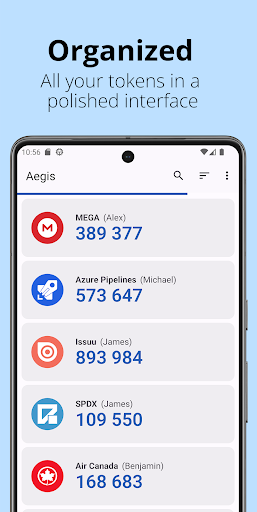
Over time, you'll likely accumulate tens of entries in your vault. Aegis Authenticator has lots of organization options to make finding the one you need at a particular moment easier. Set a custom icon for an entry to make it easier to find. Search by account name or service name. Have a lot of one-time passwords? Add them to custom groups for easier access. Personal, Work and Social can each get their own group.
Backups
To make sure you will never lose access to your online accounts, Aegis Authenticator can create automatic backups of the vault to a location of your choosing. If your cloud provider supports the Storage Access Framework of Android (like Nextcloud does), it can even create automatic backups to the cloud. Creating manual exports of the vault is also supported.
Making the switch
To make the switch easier, Aegis Authenticator can import the entries of lots of other authenticators, including: Authenticator Plus, Authy, andOTP, FreeOTP, FreeOTP+, Google Authenticator, Microsoft Authenticator, Steam, TOTP Authenticator and WinAuth (root access is required for the apps that don't have an option to export).
Feature overview
• Free and open source
• Secure
• Encrypted, can be unlocked with a password or biometrics
• Screen capture prevention
• Tap to reveal
• Compatible with Google Authenticator
• Supports industry standard algorithms: HOTP and TOTP
• Lots of ways to add new entries
• Scan a QR code or an image of one
• Enter details manually
• Import from other popular authenticator apps
• Organization
• Alphabetic/custom sorting
• Custom or automatically generated icons
• Group entries together
• Advanced entry editing
• Search by name/issuer
• Material design with multiple themes: Light, Dark, AMOLED
• Export (plaintext or encrypted)
• Automatic backups of the vault to a location of your choosing
Open source and license
Aegis Authenticator is open source and licensed under GPLv3. The source code is available here: https://github.com/beemdevelopment/Aegis
Как скачать APK Aegis Authenticator - 2FA App
- Введите имя пакета
com.beemdevelopment.aegisна главной странице APK Downloader. - Выберите архитектуру вашего устройства (для современных устройств рекомендуется ARM64).
- Нажмите Скачать, чтобы получить объединенный файл APK.
- Перенесите и установите APK на свое устройство Android.
- Следите за обновлениями: Регулярно посещайте APK Downloader, чтобы искать и скачивать последние безопасные версии ваших любимых приложений.
Безопасность и проверка подписи
Эта загрузка APK на 100% безопасна. Мы проверяем соответствие цифровой подписи файла официальным ключам разработчика. Изменения и реклама отсутствуют.