
Источники загрузки
Руководство по установке Split APK
Некоторые приложения распространяются в виде Split APK (несколько упакованных вместе файлов .apk) для оптимизации ресурсов. Стандартные установщики Android не могут их открыть.
Похожие Приложения



Что нового
Dear Users!
In This Update we struggled to find BUGS to FIX but we couldn't find any:(
Let us know how you find our NotesU app?? Did You loved it or not??
We are waiting for your responses in review section hurry up guys!!
Team:)
О приложении
📝 The Ultimate Note-Taking App for Productivity & Organization
Looking for a fast, simple, and feature-packed note-taking app? Meet NotesU, your all-in-one notepad app designed for quick notes, shopping lists, and task management. Whether you need to jot down ideas, or track daily tasks, this notebook app keeps everything organized in one place.
From color-coded notes and custom categories to shopping lists and task manager features, this app ensures seamless organization and easy access to all your important information.
✨ Why Choose This Notes App?
✔ Easy & Fast Note-Taking – Write down ideas, lists, and reminders effortlessly.
✔ Color-Coded Notes – Assign colors for easy note organization.
✔ Custom Categories – Organize notes into personalized category.
✔ Pin & Favorite Notes – Keep important notes always visible.
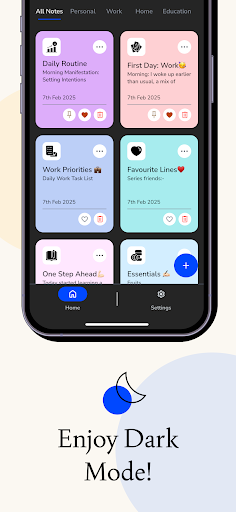
✔ Dark Mode & Light Mode – Switch themes for better readability.
✔ PDF Export – Save and share notes with ease.
✔ Minimalist & User-Friendly Design – A clean, distraction-free interface.
✔ Fast & Lightweight – Works smoothly on all devices.
📌 Key Features of the Notes App:
📒 Color-Coded Notes for Easy Organization
Organize your notebook app like never before! Assign different colors to each note to quickly distinguish work tasks, personal notes, to-do lists, and shopping lists.
📂 Custom Categories – Organize Notes Your Way
Unlike basic notepad apps, this app allows you to create, rename, and manage categories to store notes efficiently. Whether you need a task manager, a journal, or a personal planner, you can categorize and find notes easily.
📌 Pin & Favorite Notes – Instant Access to Important Notes
Never lose track of essential information! Pin your most important notes at the top or mark them as favorites for quick access anytime.
🌙 Dark Mode & Light Mode – Work Comfortably Anytime
Switch between dark mode and light mode to reduce eye strain and enhance readability, ensuring a smooth note-taking experience at any time of the day.
☁️ Cloud Storage - Access Anywhere, Anytime!
Your notes are securely backed up to the cloud.
Sync across all your devices and never lose a thought — even if you change phones or uninstall the app
📱 Local Storage - Offline & Private
Your notes are saved only on your device.
Great for full privacy or when you don’t need sync. Just remember: if you uninstall the app or reset your device, your notes may be lost.
📄 PDF Export – Save & Share Notes Effortlessly
Need to share your notepad app content? With one-tap PDF export, you can save notes in PDF format and share them easily with friends, colleagues, or clients.
💡 Quick & Efficient Note-Taking
This notepad app is built for speed and efficiency. Create, edit, and manage notes without unnecessary distractions. Perfect for students, professionals, and everyday users who need an organized notebook app.
🎯 Who Needs This Note-Taking App?
✅ Students – Take lecture notes, create study lists, and track assignments.
✅ Professionals – Use it as a notepad app for meeting notes, brainstorming, and work projects.
✅ Busy Individuals – Use it as a to-do list manager or shopping list app to track daily tasks.
✅ Shoppers – Quickly create and update your grocery list for easy shopping.
Whether you're looking for a notepad app, a shopping list organizer, a task manager, or a to-do list manager, this free note-taking app is perfect for you!
🚀 What Makes This Notes App Stand Out?
Unlike other note-taking apps, our NotesU app offers intuitive organization, smooth performance, and feature-rich note management without unnecessary complexity.
✔ Optimized for All Devices – Works perfectly on smartphones & tablets.
✔ No Sign-Up Required – Start taking notes instantly without account creation.
✔ Limited Free Access – Enjoy all features(Offers Premium Plans)
Privacy Policies: https://atharva-system.github.io/notesu.github.io/privacy_policy.html
Terms & Conditions: https://atharva-system.github.io/notesu.github.io/terms_and_conditions.html
Как скачать APK Notes.U: ColorNote taking, PDF
- Введите имя пакета
com.atharva.notesuна главной странице APK Downloader. - Выберите архитектуру вашего устройства (для современных устройств рекомендуется ARM64).
- Нажмите Скачать, чтобы получить объединенный файл APK.
- Перенесите и установите APK на свое устройство Android.
- Следите за обновлениями: Регулярно посещайте APK Downloader, чтобы искать и скачивать последние безопасные версии ваших любимых приложений.
Безопасность и проверка подписи
Эта загрузка APK на 100% безопасна. Мы проверяем соответствие цифровой подписи файла официальным ключам разработчика. Изменения и реклама отсутствуют.