
Источники загрузки
Device Configuration
Руководство по установке Split APK
Некоторые приложения распространяются в виде Split APK (несколько упакованных вместе файлов .apk) для оптимизации ресурсов. Стандартные установщики Android не могут их открыть.
Похожие Приложения




Что нового
Bug fixes and performance improvements
О приложении
Seen a photo and thought: “Where is this?”
GeoFinder is built to answer that—fast.
How GeoFinder works
Upload a photo
Add a few quick details (optional but powerful): country guess, city hint, category, time period
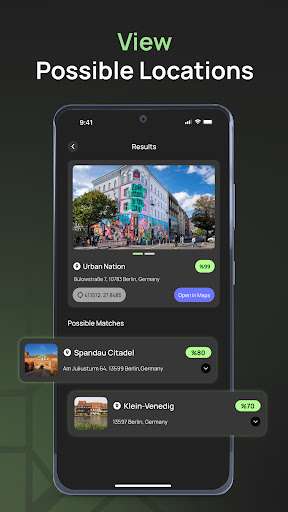
GeoFinder analyzes the image and returns the most likely location matches
From travel memories to places you spotted online, GeoFinder helps you identify locations from a single image and narrow down the best candidates.
What you get
Find a location from a photo: One image in, likely places out.
Hint-assisted accuracy: Your inputs improve relevance and confidence.
Ranked results: Top matches first, based on confidence.
Clean, quick flow: Upload → Analyze → Results.
Perfect for
Finding the exact spot in your travel photos
Discovering places you saw on social media
Organizing old photos by location
Solving “Which landmark / street / beach is this?” instantly
Privacy, clearly
Photos are processed only to generate results.
You control what happens next: save results or use it one-time.
GeoFinder is for location discovery, not surveillance.
Note: Results can vary depending on photo quality, angle, lighting, and available visual matches. GeoFinder provides the most probable matches.
Как скачать APK GeoFinder - Explore the World!
- Введите имя пакета
co.twowise.geofinderна главной странице APK Downloader. - Выберите архитектуру вашего устройства (для современных устройств рекомендуется ARM64).
- Нажмите Скачать, чтобы получить объединенный файл APK.
- Перенесите и установите APK на свое устройство Android.
- Следите за обновлениями: Регулярно посещайте APK Downloader, чтобы искать и скачивать последние безопасные версии ваших любимых приложений.
Безопасность и проверка подписи
Эта загрузка APK на 100% безопасна. Мы проверяем соответствие цифровой подписи файла официальным ключам разработчика. Изменения и реклама отсутствуют.