
Fontes de download
Device Configuration
Guia de Instalação de Split APKs
Alguns aplicativos são distribuídos como Split APKs (vários arquivos .apk empacotados juntos) para otimizar os recursos. Os instaladores padrão do Android não podem abri-los.
Aplicativos Relacionados


Novidades
6.04:
-support new hardware
-init_boot backup
-more s2s options
-update translations
6.03:
-update for Android 14
-minor bug fixes and improvements
-update translations
5.98:
-support themed icon
5.90:
-update for Android 13
5.86:
-new Flash Center, import and create custom kernel JSON configs
-new Storage screen
-improve Temperature sensors
-bug fixes and optimizations
5.83:
-improve vendor_dlkm backup/restore
-fix block wakelocks on newer devices
5.81:
-backup and restore vendor_dlkm
Sobre este aplicativo
EX Kernel Manager (EXKM) is the ultimate root tool for backup and flashing kernels, tweaking color, sound, gestures and other kernel settings. EXKM gives you total control over your hardware with premium features and a simple and modern user interface.
** Your device must be ROOTED to fully use this app
** This app works with ALL devices and kernels. ElementalX is not required.
** Some advanced features such as wake gestures, color and sound control require a compatible custom kernel
Dashboard: your homepage within the app, Dashboard summarizes your current settings and shows real-time CPU and GPU frequencies, temperatures, memory usage, uptime, deep sleep, battery level and temperature, governors, and i/o settings.
Battery Monitor: the most accurate way to measure battery life. EXKM's Battery Monitor is designed to show battery statistics that you can use to optimize battery life scientifically. EXKM Battery Monitor measures % battery use per hour and gives separate statistics for screen off (idle drain) and screen on (active drain). It automatically measures only when the battery is discharging so you never have to remember to reset the stats or create markers.
Script Manager: easily create, share , edit, execute and test shell scripts (requires SuperSU or Magisk)
Flash and Backup: save and restore kernel and recovery backups, flash any boot.img, recovery zip, Magisk module or AnyKernel zip. Import custom kernel JSON configs
CPU Settings: easily create, share and load CPU governor profiles for maximum battery life. Adjust max frequency, min frequency, CPU governor, CPU boost, hotplugging, thermals and voltage (if supported by kernel/hardware)
Graphics Settings: Max frequency, min frequency, GPU governor and more.
Advanced Color Control: RGB controls, saturation, value, contrast, hue and K-Lapse. Save, load and share custom profiles. (requires kernel support)
Wake Gestures: sweep2wake, doubletap2wake, sweep2sleep, haptic feedback, camera gesture, wake timeout and more (requires kernel support).
Custom User Settings: This feature allows you to add any kernel setting you want. Kernel settings are located in the /proc and /sys directories. Navigate to the desired path and quickly and easily add the setting to the app where it can be changed on the fly or applied at boot. Plus you can easily import/export your custom settings and share with other users.
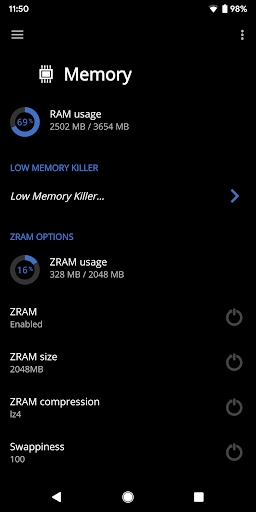
Memory Settings: adjust zRAM, KSM, lowmemorykiller, and virtual memory settings
Sound Control: adjust speaker, headphone and mic gain. Supports elementalx, fauxsound, franco sound control, and others (requires kernel support).
CPU Times: Show CPU frequency usage and deep sleep, and optionally sort by most used frequencies.
Update or Install ElementalX: Get notified and quickly download and install the ElementalX Kernel on supported devices.
Many other settings: i/o scheduler, readahead kb, fsync, zRAM, KSM, USB fastcharge, TCP congestion algorithm, last kernel log, magnetic cover control, memory settings, entropy settings, Vox Populi and much more!
ElementalX custom kernel is available for the Samsung Galaxy S9/9+, Google Pixel 4a, Pixel 4/4XL, Pixel 3/3 XL, Pixel 3a/3a XL,Pixel 2/2 XL, Pixel/Pixel XL, Nexus 5, Nexus 6, Nexus 5X, Nexus 6P, Nexus 7 (2013), Nexus 9, OnePlus Nord, OnePlus 8 Pro, OnePlus 7 Pro, OnePlus 6/6T, OnePlus 5/5T, OnePlus 3/3T, Essential PH-1, HTC One m7/m8/m9, HTC 10, HTC U11, Moto G4/G4 Plus, Moto G5 Plus, Moto Z, and Xiaomi Redmi Note 3.
Como baixar o APK do EX Kernel Manager
- Insira o nome do pacote
flar2.exkernelmanagerna página inicial do APK Downloader. - Selecione a arquitetura do seu dispositivo (ARM64 recomendado para dispositivos modernos).
- Clique em Baixar para obter o arquivo APK mesclado.
- Transfira e instale o APK no seu dispositivo Android.
- Mantenha-se atualizado: Visite o APK Downloader regularmente para pesquisar e baixar as versões seguras mais recentes de seus aplicativos favoritos.
Segurança e Verificação de Assinatura
Este download de APK é 100% seguro. Verificamos se a assinatura criptográfica do arquivo corresponde às credenciais oficiais do desenvolvedor. Sem modificações ou adware injetados.