
Fontes de download
Device Configuration
Guia de Instalação de Split APKs
Alguns aplicativos são distribuídos como Split APKs (vários arquivos .apk empacotados juntos) para otimizar os recursos. Os instaladores padrão do Android não podem abri-los.
Aplicativos Relacionados


Novidades
* Updates and small improvements
Sobre este aplicativo
Home Security Camera ZoomOn 🏠 is a smart app for guarding and monitoring your home. Simply connect any two smartphones and turn them into the perfect home security system.
Do you feel nervous and uncomfortable when leaving your home unguarded? Home security camera ZoomOn comes in handy whenever you leave your house for work, vacation, or errands. So dust off your unused phone and give it a new purpose - turn it into a wifi cam!
How Home Security Camera ZoomOn app works:
1) Install the app on two mobile devices (smartphone or tablet, Android or iOS).
2) Launch the app on both devices and pair them with a numeric/QR code.
3) Place the first device in a suitable spot in your apartment/house.
4) Keep the second device with you and start monitoring!
Functions of WiFi camera app ZoomOn:
✔ Live video stream in HD
✔ Unlimited reach (WiFi, 3G, 4G, 5G, LTE)
✔ Two-way audio & video
✔ Night mode (green screen)
✔ Lighting
✔ Recordings
✔ Continuous recording (Playback)
✔ Motion detection
✔ Noise detection
✔ Zooming
✔ Smart notifications
✔ Time plans
✔ Low battery alert
✔ Multiplatform support
✔ Multi-room & multi-owner mode
✔ Audio activity chart
✔ Monitoring time
✔ Compatibility with some ONVIF-compliant security cameras
✔ Only one subscription for multiple devices
LIVE VIDEO IN HD
This home security camera app provides you with full-screen real-time video. Live streaming is the feature that keeps your house always guarded. Feel free to use the front or back camera of your monitoring device.
UNLIMITED REACH
Security cam app operates seamlessly across WiFi, 3G, 4G, 5G, or LTE networks. It effortlessly and swiftly re-establishes connection in the event of a WiFi disruption. The extensive support for various networks ensures you enjoy uninterrupted connectivity without limits.
NIGHT MODE & LIGHTING
Experience the power of night vision (with a cool green screen filter) to keep a watchful eye on your home, no matter how dark it gets! And when you need that extra brightness, just flip on the flashlight feature for a crystal-clear view of every corner.
ALARMS & NOTIFICATIONS
Get instant alerts if your WiFi cam app disconnects or its battery dips below 10%. Trust the precision of our built-in alarms. Plus, enjoy the convenience of an automatic timeline that captures every monitoring session, giving you a seamless overview of your entire history.
HIGH-QUALITY TWO-WAY AUDIO
Customize noise sensitivity to receive alerts about any activity in the monitored zone. Need to communicate? Hit the mike button and turn your monitoring device into a walkie-talkie.
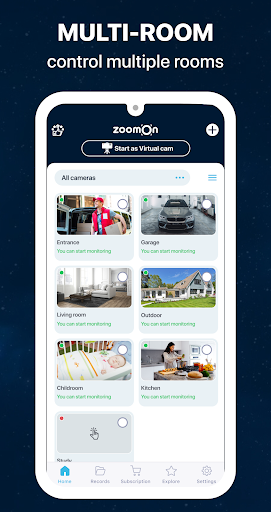
MULTI-ROOM MONITORING
Keep an eye on every corner of your home with this WiFi cam app. Easily monitor multiple rooms simultaneously by installing the ZoomOn app on various smartphones strategically placed throughout your house.
SECURITY FIRST
All communication between the devices is securely encrypted via a private cloud solution. Industry-standard encryption is used to ensure that only you have access to your stream.
RE-USE OLD DEVICES
Do not buy a home camera when you have fully functional old mobile phones at home. Giving them a new meaningful function of monitoring your home does not sound bad, huh?
VIEWER FOR YOUR SECURITY CAMERA
The app can find available ONVIF-compliant IP security camera on your Wi-Fi network (You can only view the footage from the security camera if both devices are connected to the same Wi-Fi network.).
TRY BEFORE YOU BUY!
This WiFi camera app is free to download. You can try all the features during the free 3-day trial. And if you're happy with our wifi cam app, you can buy a subscription - monthly, yearly, or lifetime.
***
Looking for home security tips? Visit our blog: www.zoomon.camera!
Turn your phone into a security camera, baby monitor, elderly monitoring system or pet camera with ZoomOn app!
Como baixar o APK do ZoomOn Home Security Camera
- Insira o nome do pacote
cz.master.loisna página inicial do APK Downloader. - Selecione a arquitetura do seu dispositivo (ARM64 recomendado para dispositivos modernos).
- Clique em Baixar para obter o arquivo APK mesclado.
- Transfira e instale o APK no seu dispositivo Android.
- Mantenha-se atualizado: Visite o APK Downloader regularmente para pesquisar e baixar as versões seguras mais recentes de seus aplicativos favoritos.
Segurança e Verificação de Assinatura
Este download de APK é 100% seguro. Verificamos se a assinatura criptográfica do arquivo corresponde às credenciais oficiais do desenvolvedor. Sem modificações ou adware injetados.