
Fontes de download
Device Configuration
Guia de Instalação de Split APKs
Alguns aplicativos são distribuídos como Split APKs (vários arquivos .apk empacotados juntos) para otimizar os recursos. Os instaladores padrão do Android não podem abri-los.
Aplicativos Relacionados




Novidades
* 'Add track' in Live Performance mode could cause a crash when 16 or more tracks were present. Solved.
* Saving a project would un-arm the tracks and the arm state was therefore not stored. Solved.
* Selecting MIDI remote setup would un-arm the tracks. Solved.
* Improved memory management when switching Soundfonts.
* The volume peak calculation for the right channel of a stereo track was wrong in situations where a zero-crossing needed to be calculated. Solved.
Sobre este aplicativo
From recording song ideas to full-fledged mobile productions, Audio Evolution Mobile sets the standard for music creation, mixing and editing on Android. Whether you are recording using the internal mic or recording from a multi-channel USB audio (*) or MIDI interface, Audio Evolution Mobile rivals desktop DAWs. Featuring virtual instruments, a vocal pitch and time editor, a virtual analog synthesizer, real-time effects, mixer automation, audio loops, drum pattern editing and more, the app powers your creativity.
Audio Evolution Mobile Studio was chosen the #1 Android mobile music app in Computer Music - December 2020 issue!
Note that this is a TRIAL version of the full paid version and has several limitations:
• Loading of projects is limited to 3 tracks
• Mixdown is limited to 45 seconds
• Recording and playback stops after 2 minutes (45 seconds for USB audio)
• The app will quit after 20 minutes
• The app will stop working after a while
Check out our new tutorial video series: https://www.youtube.com/watch?v=2BePLCxWnDI&list=PLD3ojanF28mZ60SQyMI7LlgD3DO_iRqYW
Features:
• Multitrack audio and MIDI recording / playback
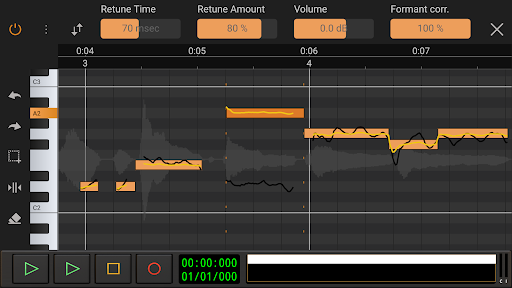
• Auto or manually tune your vocals with Vocal Tune Studio (*) : an editor to correct pitch and time of vocal recordings and the timing of any audio material. It features retune time, retune amount, volume, vibrato controls and formant correction per note.
• Virtual analog synthesizer 'Evolution One' based on the popular Synth One from AudioKit.
• Sample-based Soundfont instruments
• Drum pattern editor (including triplets and using your own audio files)
• Low latency and multichannel recording/playback using a USB audio interface (*)
• Edit audio and MIDI clips with unlimited undo/redo
• Tempo and time signature changes including gradual tempo change
• Real-time effects including chorus, compressor, delays, EQs, reverb, noise gate, pitch shifter, vocal tune etc.
• Flexible effect routing: an unlimited number of effects can be placed on a grid, featuring parallel effect paths.
• Assign LFO's to effect parameters or lock parameters to tempo
• Sidechain on the compressor effects
• Automation of all mixer and effect parameters
• Import of many formats like WAV, MP3, AIFF, FLAC, OGG and MIDI
• Mixdown to WAV, MP3, AIFF, FLAC or OGG with share option
• Unlimited number of tracks and groups
• MIDI remote control
• Projects are interchangeable with our iOS version
• Cloud sync to Google Drive (backup or share/exchange projects with one of your other devices on Android or iOS and collaborate with friends)
In short: a complete portable multitrack digital audio workstation (DAW) that will replace your 4 track recorder or tape machine at an incredibly low price!
(*) The following optional in-app purchases are available in the full version:
• A custom developed USB audio driver that bypasses the limits of Android audio when connecting a USB audio interface/mic: low latency, high quality multi-channel recording and playback at any sample rate and resolution that the device supports (for example 24-bit/96kHz). Please see here for more information and device compatibility: https://www.extreamsd.com/index.php/technology/usb-audio-driver
Note that you are always free to try the Android USB audio driver without this in-app purchase (with the limits that come with it like high latency and 16-bit audio).
• Vocal Tune with two-voice harmonizer and Vocal Tune PRO
• Vocal Tune Studio
We also sell effects and content from other vendors at reduced prices in the full version:
• ToneBoosters Flowtones
• ToneBoosters pack 1 (Barricade, DeEsser, Gate, Reverb)
• ToneBoosters V3 EQ, Compressor, Ferox
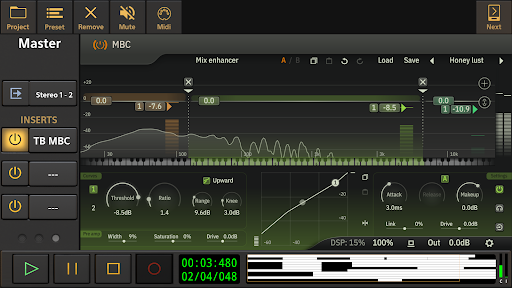
• ToneBoosters V4 Barricade, BitJuggler, Enhancer, EQ, MBC, ReelBus, Reverb, etc.
• Loops and Soundfonts at various prices
Facebook: https://www.facebook.com/AudioEvolutionMobile
Forum: https://www.extreamsd.com/forum
User manual: https://www.audio-evolution.com/manual/android/index.html
Como baixar o APK do Audio Evolution Mobile TRIAL
- Insira o nome do pacote
com.extreamsd.aemobiledemona página inicial do APK Downloader. - Selecione a arquitetura do seu dispositivo (ARM64 recomendado para dispositivos modernos).
- Clique em Baixar para obter o arquivo APK mesclado.
- Transfira e instale o APK no seu dispositivo Android.
- Mantenha-se atualizado: Visite o APK Downloader regularmente para pesquisar e baixar as versões seguras mais recentes de seus aplicativos favoritos.
Segurança e Verificação de Assinatura
Este download de APK é 100% seguro. Verificamos se a assinatura criptográfica do arquivo corresponde às credenciais oficiais do desenvolvedor. Sem modificações ou adware injetados.