
Fontes de download
Device Configuration
Guia de Instalação de Split APKs
Alguns aplicativos são distribuídos como Split APKs (vários arquivos .apk empacotados juntos) para otimizar os recursos. Os instaladores padrão do Android não podem abri-los.
Aplicativos Relacionados




Novidades
Hey 🦫
Capy is finally here. Earn your screen time instead of just losing it.
Complete real habits → your capy wakes up → your apps unlock. That's the loop.
✨ In v1.0.2:
- 5 habit categories with 1-min options
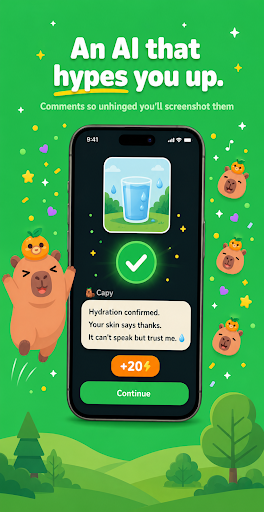
- AI that approves your photos with unhinged comments
- A capybara that reacts to every win
- Streaks that don't punish you
Sobre este aplicativo
Earn your screen time back. Don't just block it.
Complete real habits → your capybara wakes up → your apps unlock. That's the whole loop.
Capy is the only screen time app where you EARN your scroll
instead of being punished for it.
🦫 MEET YOUR CAPYBARA
Name them. Dress them. Watch them sleep when your apps are
blocked and explode with joy when you complete a habit. The
emotional bond is the point — it's why people stay months,
not days.
⚡ HOW IT WORKS
1. Open Capy instead of doomscrolling
2. Pick a habit (1-min breathing, a quick walk, journaling,
pushups, water, anything)
3. Snap a photo or finish the timer
4. Our AI checks it and roasts you with a comment you'll want
to screenshot
5. Energy bar fills → your apps unlock for a few minutes
6. Repeat → streak grows → capy glows up
🎯 BUILT FOR REAL HUMANS
- 5 habit categories: Quests, Breathing, Exercises, Journaling,
Routines — something for every mood
- 1–3 minute habits when you have zero energy (no shame here)
- AI photo verification that's actually fun, not surveillance
- ADHD-friendly: low friction, big rewards, instant feedback
- Streak system that doesn't make you cry when you miss a day
💜 WHY GEN Z PICKED CAPY
- Capybara energy: the calmest animal on earth helping you with
the loudest problem
- No corporate guilt-tripping. The enemy is Big Tech, not you
- AI comments are unhinged in the best way — every habit feels
like a punchline
- Made for humans who already tried Apple Screen Time, Opal,
one sec, and bounced
- Looks beautiful on your home screen. We tested.
🔒 PRIVACY-FIRST
Your photos never leave the verification flow. Your data is
yours. We use Apple's Family Controls and Android's Usage Stats
the way they're supposed to be used.
✨ CAPY PLUS
Unlimited AI verifications, custom habits with custom icons,
exclusive cosmetics for your capybara, advanced stats. Free
version gets you the full core loop forever.
———
The brain rot ends here. Or, more honestly: you negotiate with
it on your terms — with a capybara as your accountability buddy.
Earn your screen time. Beat the rot. Glow up.
Como baixar o APK do Capy: Earn Your Screen Time
- Insira o nome do pacote
com.capivara.appna página inicial do APK Downloader. - Selecione a arquitetura do seu dispositivo (ARM64 recomendado para dispositivos modernos).
- Clique em Baixar para obter o arquivo APK mesclado.
- Transfira e instale o APK no seu dispositivo Android.
- Mantenha-se atualizado: Visite o APK Downloader regularmente para pesquisar e baixar as versões seguras mais recentes de seus aplicativos favoritos.
Segurança e Verificação de Assinatura
Este download de APK é 100% seguro. Verificamos se a assinatura criptográfica do arquivo corresponde às credenciais oficiais do desenvolvedor. Sem modificações ou adware injetados.