
Fontes de download
Device Configuration
Guia de Instalação de Split APKs
Alguns aplicativos são distribuídos como Split APKs (vários arquivos .apk empacotados juntos) para otimizar os recursos. Os instaladores padrão do Android não podem abri-los.
Aplicativos Relacionados



Novidades
We've tightened security, fixed bugs, and improved overall performance. Update now for a safer, faster, and more reliable app experience. Need help getting the most out of Aduro? Email support@aduro.com
Sobre este aplicativo
Aduro: Your Health & Human Performance Partner
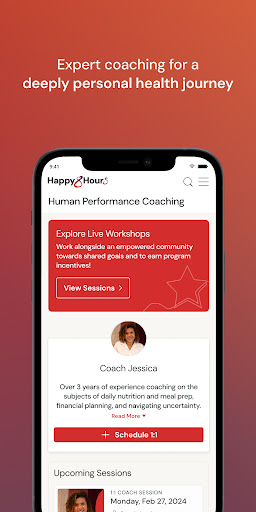
Aduro is more than a well-being app—it’s a complete, personalized experience designed to help you thrive in every area of life. We combine the most advanced testing, personalized digital content, and real human support powered by cutting-edge AI to create a health journey as unique as you are.
See your whole self. Ignite what’s possible.
We built Aduro to care for the whole person—one powerful experience that delivers real outcomes for people and the companies they work for.
Through lifestyle insights, health assessments, precision labs, and continuous health sensors, Aduro reveals how your mind, body, and habits are connected—so you can take action where it matters most.
The result? A complete view of your health and human performance—and the tools to make lasting change.
What You Can Do with Aduro
- Connect to Apple Health to make the most sense of your key health metrics
- Free access to precision labs, screenings and assessments
- See the most complete view of yourself with intelligent insights
- Explore a powerful library of content, tools and podcasts to drive lasting change at your pace
- Connect 1:1 with health and human performance coaches to help you get unstuck and keep you motivated
- Participate in immersive programs to prevent, manage, or even reverse chronic conditions
- Earn rewards and incentives for healthy habits and engagement
- Join team challenges to spark motivation and strengthen community
- View your employer-sponsored benefits in one place
Built for You. Paid for by your employer.
If your employer offers Aduro, download the app to get started.
Start your journey and unlock your full potential.
Como baixar o APK do Aduro
- Insira o nome do pacote
com.aduro.ampna página inicial do APK Downloader. - Selecione a arquitetura do seu dispositivo (ARM64 recomendado para dispositivos modernos).
- Clique em Baixar para obter o arquivo APK mesclado.
- Transfira e instale o APK no seu dispositivo Android.
- Mantenha-se atualizado: Visite o APK Downloader regularmente para pesquisar e baixar as versões seguras mais recentes de seus aplicativos favoritos.
Segurança e Verificação de Assinatura
Este download de APK é 100% seguro. Verificamos se a assinatura criptográfica do arquivo corresponde às credenciais oficiais do desenvolvedor. Sem modificações ou adware injetados.