
डाउनलोड स्रोत
Device Configuration
स्प्लिट एपीके (Split APK) स्थापना गाइड
कुछ ऐप्स स्प्लिट एपीके (एक साथ पैक की गई कई .apk फाइलें) के रूप में वितरित किए जाते हैं। मानक एंड्रॉइड इंस्टॉलर उन्हें खोल नहीं सकते हैं।
सम्बन्धित ऐप्स




नया क्या है
V2.5.7
👍Some better UI design, improve user experience
🎈Fix some minor bugs, work better on your devices
V2.5.6
🌟Optimize performance, reduce application no response
🎊Improved UI, enhanced interactive experience
V2.5.5
💯Capability enhancement, better music experience
🔥Optimize performance, reduce application no response
इस ऐप के बारे में
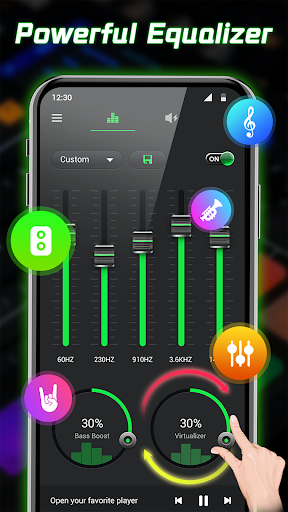
Equalizer - Bass Booster & Volume Booster is a full-featured and easy-to-use music Equalizer app with Bass Booster, Volume Booster, 3D Virtualizer and Visualization effects. It allows you to improve the music or audio quality on your Android device. Using the Equalizer & Volume Booster, you can easily reset the music effect, control the volume and boost the bass sound. 🎈💯
Equalizer & Volume Booster can meet all your needs for music. Equalizer - Bass booster can access all types of music player apps, it is an excellent sound booster and bass booster. Whether you're listening to music, playing games, watching movies or watching videos, it can help you balance your sound in the best way. Equalizer- Bass & Volume Boost creates an unprecedented listening experience and brings your music to a higher level. 🎉🎊
🎸Powerful Equalizer & Sound Effects
* 5-band Equalizer or 10-band for android 10+, satisfy different music styles
* Fulfill delicate musical taste: 31HZ, 62HZ, 125HZ, 250HZ, 500HZ, 1KHZ, 2KHZ, 4KHZ, 8KHZ, 16KHZ
* 28 presets to choose from: Classical, Dance, Flat, Folk, Heavy Metal, Hip Hop, Jazz, Rock, R&B...
* Customize and save your own music equalizer settings
📣Professional Volume Booster & Audio Enhancer
* Max super volume amplifier, boost volume up to 200%
* Fast to adjust the volume to 40%, 60%, 80% and maximum level
* Increase all media volume such as music, video, game, ringtone, alarm, audio book...
🚀Amazing Bass Booster & 3D Virtualizer
* Boost or amplifier music bass to the level you want
* Support use with headphone, phone speaker and Bluetooth
* 3D surround virtualizer makes media files produce quality sound in a digital surround support
💥More Features for Equalizer - Bass Booster & Volume Booster
☆ Media volume control
☆ Music Virtualizer effect
☆ Stereo surround sound effect
☆ Visual sound spectrum
☆ Music control: play/pause, next/previous song
☆ Save and delete custom presets
☆ Cool edge lighting
☆ Home screen widgets(1x1, 2x2, 4x1, 4x2, 4x4 )
☆ Display the song title and artist
☆ Notification shortcuts
☆ Customize UI theme
☆ Compatible with pop music players
☆ Optimize for phones and tablets
☆ No root required
Equalizer - Bass Booster & Volume Booster effectively helps you create unlimited sound effects. Download it right now and then enjoy your music on an entirely new level! 🌈🔥
Foreground Service Permission Statement:
The equalizer app runs as a foreground service, which ensures that the adjusted audio effect stay active, regardless of any system constraints. Even if the user exits the equalizer interface, the sound optimization will continue in the background without affecting any user experience. Through the notification bar or widget, users can directly adjust the sound effects, without frequently opening the app
Equalizer- Bass Booster&Volume एपीके कैसे डाउनलोड करें
- APK Downloader होमपेज पर पैकेज नाम
tool.audio.bassbooster.equalizerदर्ज करें। - अपने डिवाइस आर्किटेक्चर का चयन करें (आधुनिक उपकरणों के लिए ARM64 अनुशंसित है)।
- मर्ज की गई एपीके फ़ाइल प्राप्त करने के लिए डाउनलोड पर क्लिक करें।
- एपीके को अपने एंड्रॉइड डिवाइस पर ट्रांसफर और इंस्टॉल करें।
- अपडेट रहें: अपने पसंदीदा ऐप्स के नवीनतम सुरक्षित संस्करणों को खोजने और डाउनलोड करने के लिए नियमित रूप से APK Downloader पर जाएं।
सुरक्षा और हस्ताक्षर सत्यापन
यह APK डाउनलोड 100% सुरक्षित है। हम सत्यापित करते हैं कि फ़ाइल का क्रिप्टोग्राफ़िक हस्ताक्षर आधिकारिक डेवलपर क्रेडेंशियल से मेल खाता है। कोई संशोधन या एडवेयर नहीं हैं।