
डाउनलोड स्रोत
Device Configuration
स्प्लिट एपीके (Split APK) स्थापना गाइड
कुछ ऐप्स स्प्लिट एपीके (एक साथ पैक की गई कई .apk फाइलें) के रूप में वितरित किए जाते हैं। मानक एंड्रॉइड इंस्टॉलर उन्हें खोल नहीं सकते हैं।
सम्बन्धित ऐप्स



नया क्या है
🎥 AI HD Enhance: Turn low-quality videos into clear HD.
🎨 Subtitle Styles: New presets and fonts added.
🚀 Playback optimized for a smoother experience.
इस ऐप के बारे में
Video Player All Format - Your Powerful & Free Android Video Player!
This max video player supports full HD videos up to 4K and 1080p, delivering stunning video quality. With its easy controls and subtitle support, you can fully immerse yourself in your favorite videos!
Experience the best video player - Video Player All Format:
🌟 Supports ALL video formats: MKV, MP4, AVI, WMV, RMVB, TS, MOV, 3GP, FLV, etc.
🌟 Crystal-clear HD Video Player
🌟 Resume playback from the last watched location
🌟 Adjust video speed from 0.5x to 2x
🌟 Easy operation with gesture controls
🌟 Automatically detects videos on phone and SD card
🌟 Manage videos with rename and additional options
🌟 Sleep Timer & Night Mode for a comfortable experience
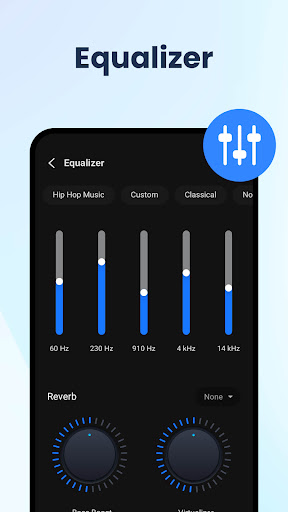
🌟 Fine-tune audio with a Five-band equalizer and bass boost
🌟 Download and add subtitles to your videos
🎬 HD Video Player with Many Features!
Experience high-quality video playback with this versatile HD Video Player. Enjoy various features like 10-second fast forward and rewind for quick navigation. Fine-tune your sound with the built-in equalizer and reduce brightness with Night Mode for comfortable viewing.
✨ Subtitle Support - Elevate Your Video Experience!
Enhance your video experience with subtitle support. Watch your favorite movies and shows with added clarity and understanding. The HD Video Player ensures you never miss a word.
💡 Popup Play & Background Playback - Multitask like a Pro!
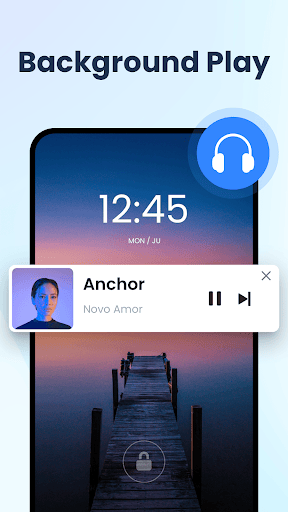
Multitask like a pro with Popup Play - watch videos in a floating window while you chat or browse. Plus, enjoy Background Playback to listen to your videos even when your screen is off.
⏩ Adjust Speed - Easily control the pace of playback
Take control of your video speed with this versatile Media Player. Adjust playback speed from 0.5x to 2.0x for slow motion or fast-forward viewing. Perfect for educational content or tutorials.
Discover the ultimate HD Video Player All Format for a seamless video playback. We'd love to hear your thoughts and suggestions! Reach out to us via email at vidplayer.feedback@gmail.com. Your feedback is valuable to us!
HD Video Player All Format एपीके कैसे डाउनलोड करें
- APK Downloader होमपेज पर पैकेज नाम
maxplayer.video.videoplayerदर्ज करें। - अपने डिवाइस आर्किटेक्चर का चयन करें (आधुनिक उपकरणों के लिए ARM64 अनुशंसित है)।
- मर्ज की गई एपीके फ़ाइल प्राप्त करने के लिए डाउनलोड पर क्लिक करें।
- एपीके को अपने एंड्रॉइड डिवाइस पर ट्रांसफर और इंस्टॉल करें।
- अपडेट रहें: अपने पसंदीदा ऐप्स के नवीनतम सुरक्षित संस्करणों को खोजने और डाउनलोड करने के लिए नियमित रूप से APK Downloader पर जाएं।
सुरक्षा और हस्ताक्षर सत्यापन
यह APK डाउनलोड 100% सुरक्षित है। हम सत्यापित करते हैं कि फ़ाइल का क्रिप्टोग्राफ़िक हस्ताक्षर आधिकारिक डेवलपर क्रेडेंशियल से मेल खाता है। कोई संशोधन या एडवेयर नहीं हैं।