Yandex Browser with Alice AI

Yandex Browser with Alice AI

Direct Cursus Computer Systems Trading LLC
★★★★☆ 4.4 Personalization v26.3.2.108 100,000,000+
Verified Safe & Direct
APK डाउनलोड करें Google Play

डाउनलोड स्रोत

Device Configuration

स्प्लिट एपीके (Split APK) स्थापना गाइड

कुछ ऐप्स स्प्लिट एपीके (एक साथ पैक की गई कई .apk फाइलें) के रूप में वितरित किए जाते हैं। मानक एंड्रॉइड इंस्टॉलर उन्हें खोल नहीं सकते हैं।

1. Download Split APKs Installer (SAI) from Google Play Store.
2. Download the app archive (.apks) using the download sources listed above.
3. Open SAI, click "Install APKs", choose the downloaded archive, and click Install.

सम्बन्धित ऐप्स

संस्करण
26.3.2.108
डाउनलोड
100,000,000+
अपडेट किया गया
Jun 26, 2026
डेवलपर
Direct Cursus Computer Systems Trading LLC
श्रेणी
Personalization
कंटेंट रेटिंग
Everyone
पैकेज
com.yandex.browser
Platform
Android
ScreenshotScreenshotScreenshotScreenshotScreenshotScreenshot

नया क्या है

Yandex Browser's AI keeps the original voice and tone when translating videos from English to Russian. So you don't just get the words — you feel the vibe.

इस ऐप के बारे में

Yandex Browser — stylish and secure, with voice search and data compression.

Get rid of annoying ads on websites by integrating third-party blocking apps with ad blocking.

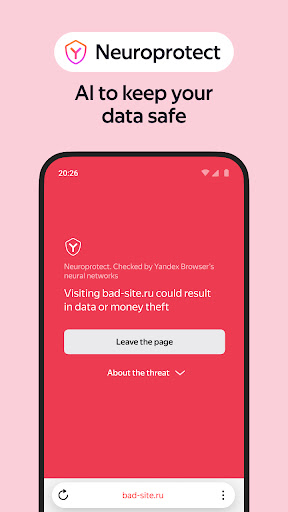
Protect your personal data when using public Wi-Fi networks and stay away from harmful or fraudulent pages with the browser’s active security system Protect.

Hide unrelated interface elements — ads, site menus, buttons, or widgets — and leave only the relevant text and accompanying images on the screen with Reader Mode.

Surf the web in private using Incognito Mode — Yandex Browser will not keep track of your passwords, search queries, or browsing history in this mode.

Customize your Yandex Browser with a wide array of backgrounds in the wallpaper library to suit any style or mood.

Access your favorite websites and bookmarks on any of your devices – just allow syncing of your data in your Yandex account.

If you have any questions or suggestions, you can contact us straight from the app, or via https://browser.yandex.com/feedback.

Yandex Browser with Alice AI एपीके कैसे डाउनलोड करें

  1. APK Downloader होमपेज पर पैकेज नाम com.yandex.browser दर्ज करें।
  2. अपने डिवाइस आर्किटेक्चर का चयन करें (आधुनिक उपकरणों के लिए ARM64 अनुशंसित है)।
  3. मर्ज की गई एपीके फ़ाइल प्राप्त करने के लिए डाउनलोड पर क्लिक करें।
  4. एपीके को अपने एंड्रॉइड डिवाइस पर ट्रांसफर और इंस्टॉल करें।
  5. अपडेट रहें: अपने पसंदीदा ऐप्स के नवीनतम सुरक्षित संस्करणों को खोजने और डाउनलोड करने के लिए नियमित रूप से APK Downloader पर जाएं।

सुरक्षा और हस्ताक्षर सत्यापन

यह APK डाउनलोड 100% सुरक्षित है। हम सत्यापित करते हैं कि फ़ाइल का क्रिप्टोग्राफ़िक हस्ताक्षर आधिकारिक डेवलपर क्रेडेंशियल से मेल खाता है। कोई संशोधन या एडवेयर नहीं हैं।

पहचान Basic Access
  • डिवाइस पर खाते ढूंढें
  • खाते जोड़ें या निकालें
कैलेंडर Basic Access
  • कैलेंडर इवेंट के साथ-साथ गोपनीय जानकारी पढ़ें
  • अपनी जानकारी के बि‍ना कैलेंडर इवेंट जोड़ें या संशोधि‍त करें और अति‍थि‍यों को ईमेल भेजें
संपर्क Basic Access
  • डिवाइस पर खाते ढूंढें
  • अपने संपर्क पढ़ें
  • अपने संपर्क बदलें
जगह Basic Access
  • अनुमानित स्थान (नेटवर्क-आधारित)
  • सटीक स्थान (GPS और नेटवर्क-आधारित)
फ़ोन Basic Access
  • फ़ोन नंबर पर सीधे कॉल करें
  • फ़ोन की स्‍थिति और पहचान पढ़ें
फ़ोटो/मीडिया/फ़ाइलें Basic Access
  • अपने USB स्टोरेज की सामग्री पढ़ें
  • अपने USB स्टोरेज की सामग्री बदलें या मिटाएं
डिवाइस का स्टोरेज Basic Access
  • अपने USB स्टोरेज की सामग्री पढ़ें
  • अपने USB स्टोरेज की सामग्री बदलें या मिटाएं
कैमरा Basic Access
  • चित्र और वीडियो लें
माइक्रोफ़ोन Basic Access
  • ऑडियो रिकॉर्ड करें
वाई-फ़ाई कनेक्शन की जानकारी Basic Access
  • वाई-फ़ाई कनेक्शन देखें
डिवाइस आईडी और कॉल की जानकारी Basic Access
  • फ़ोन की स्‍थिति और पहचान पढ़ें
अन्‍य Basic Access
  • नेटवर्क कनेक्शन देखें
  • खाते बनाएं और पासवर्ड सेट करें
  • ब्लूटूथ डिवाइस के साथ युग्मित करें
  • वाई-फ़ाई से कनेक्‍ट और डिस्‍कनेक्‍ट करें
  • फ़्लैशलाइट नियंत्रित करें
  • पूरा नेटवर्क ऐक्सेस
  • अपनी ऑडि‍यो सेटिंग बदलें
  • नियर फ़ील्‍ड कम्‍यूनिकेशन नियंत्रित करें
  • समन्वयन सेटिंग पढ़ें
  • प्रारंभ होने पर चलाएं
  • वॉलपेपर सेट करें
  • अन्‍य ऐप्स पर खींचें
  • डिवाइस पर खातों का इस्तेमाल करें
  • कंपन नियंत्रित करें
  • डिवाइस को निष्‍क्रिय होने से रोकें
  • सिस्‍टम सेटिंग बदलें
  • समन्‍वयन चालू और बंद टॉगल करें
  • अलार्म सेट करें
  • शॉर्टकट इंस्‍टॉल करें