
डाउनलोड स्रोत
Device Configuration
स्प्लिट एपीके (Split APK) स्थापना गाइड
कुछ ऐप्स स्प्लिट एपीके (एक साथ पैक की गई कई .apk फाइलें) के रूप में वितरित किए जाते हैं। मानक एंड्रॉइड इंस्टॉलर उन्हें खोल नहीं सकते हैं।
सम्बन्धित ऐप्स


नया क्या है
General fixes and improvements.
इस ऐप के बारे में
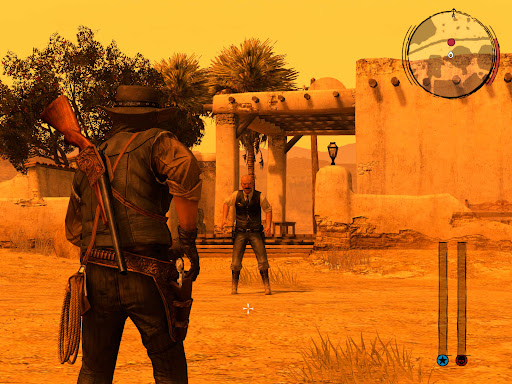
When federal agents threaten his family, former outlaw John Marston is forced to hunt down the gang of criminals he once called friends. Experience Marston’s journey across the sprawling expanses of the American West and Mexico as he fights to bury his blood-stained past in the critically acclaimed predecessor to the 2018 blockbuster, Red Dead Redemption 2.
Also included is Undead Nightmare, the iconic horror story that transforms the world of Red Dead Redemption into an apocalyptic fight for survival against a zombie horde. Available on mobile for the first time, this version features the complete single-player experiences of both games and also includes bonus content from the Game of the Year Edition and more.*
* Red Dead Redemption does not feature multiplayer content.
© 2005-2025 Rockstar Games, Inc. Rockstar Games, Red Dead, Red Dead Redemption, Undead Nightmare, the R* Logo, and related logos are trademarks of Take-Two Interactive Software, Inc. Uses Bink Video. ©1997–2025 by Epic Games Tools, Inc. All other marks and trademarks are properties of their respective owners. All rights reserved.
Red Dead Redemption एपीके कैसे डाउनलोड करें
- APK Downloader होमपेज पर पैकेज नाम
com.rockstargames.rdrदर्ज करें। - अपने डिवाइस आर्किटेक्चर का चयन करें (आधुनिक उपकरणों के लिए ARM64 अनुशंसित है)।
- मर्ज की गई एपीके फ़ाइल प्राप्त करने के लिए डाउनलोड पर क्लिक करें।
- एपीके को अपने एंड्रॉइड डिवाइस पर ट्रांसफर और इंस्टॉल करें।
- अपडेट रहें: अपने पसंदीदा ऐप्स के नवीनतम सुरक्षित संस्करणों को खोजने और डाउनलोड करने के लिए नियमित रूप से APK Downloader पर जाएं।
सुरक्षा और हस्ताक्षर सत्यापन
यह APK डाउनलोड 100% सुरक्षित है। हम सत्यापित करते हैं कि फ़ाइल का क्रिप्टोग्राफ़िक हस्ताक्षर आधिकारिक डेवलपर क्रेडेंशियल से मेल खाता है। कोई संशोधन या एडवेयर नहीं हैं।