
डाउनलोड स्रोत
Device Configuration
स्प्लिट एपीके (Split APK) स्थापना गाइड
कुछ ऐप्स स्प्लिट एपीके (एक साथ पैक की गई कई .apk फाइलें) के रूप में वितरित किए जाते हैं। मानक एंड्रॉइड इंस्टॉलर उन्हें खोल नहीं सकते हैं।
सम्बन्धित ऐप्स




नया क्या है
Fonty Keyboard is finally here. Send callout messages with your own created fonts.
इस ऐप के बारे में
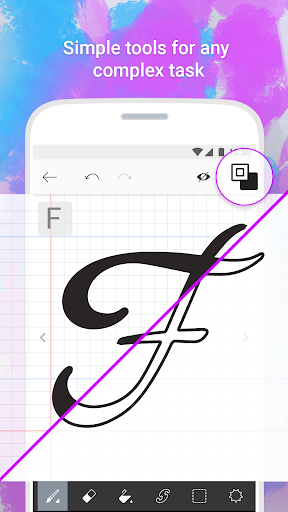
Create your own fonts with Fonty - the easy-to-use font making app that provides limitless font customization for everyone. The font editor gives you full creative power to make truly unique handwritten fonts or simply personalize existing ones and express yourself through text. Draw your own letters, use shapes, cut and splice, and even add awesome clipart, Fonty has got it all. Whether you're a lettering newbie or a seasoned typography master, you'll never want to use boring old fonts again.
Features:
Auto-save and Drafts so you never lose your work
Font Preview to see how your new alphabet looks every step of the way
Easy font export to other devices and applications
Visual guides and lettering hints to help you along the way
Support for over 15 languages and alphabets, with more coming soon
Brushes to make elegant calligraphy
Stickers to truly personalize and beautify your fonts
Fonty - Draw and Make Fonts एपीके कैसे डाउनलोड करें
- APK Downloader होमपेज पर पैकेज नाम
com.palabs.fontyदर्ज करें। - अपने डिवाइस आर्किटेक्चर का चयन करें (आधुनिक उपकरणों के लिए ARM64 अनुशंसित है)।
- मर्ज की गई एपीके फ़ाइल प्राप्त करने के लिए डाउनलोड पर क्लिक करें।
- एपीके को अपने एंड्रॉइड डिवाइस पर ट्रांसफर और इंस्टॉल करें।
- अपडेट रहें: अपने पसंदीदा ऐप्स के नवीनतम सुरक्षित संस्करणों को खोजने और डाउनलोड करने के लिए नियमित रूप से APK Downloader पर जाएं।
सुरक्षा और हस्ताक्षर सत्यापन
यह APK डाउनलोड 100% सुरक्षित है। हम सत्यापित करते हैं कि फ़ाइल का क्रिप्टोग्राफ़िक हस्ताक्षर आधिकारिक डेवलपर क्रेडेंशियल से मेल खाता है। कोई संशोधन या एडवेयर नहीं हैं।