Intune Company Portal

Intune Company Portal

Microsoft Corporation
★★★☆☆ 2.6 Business v5.0.7009.0 50,000,000+
Verified Safe & Direct
APK डाउनलोड करें

डाउनलोड स्रोत

स्प्लिट एपीके (Split APK) स्थापना गाइड

कुछ ऐप्स स्प्लिट एपीके (एक साथ पैक की गई कई .apk फाइलें) के रूप में वितरित किए जाते हैं। मानक एंड्रॉइड इंस्टॉलर उन्हें खोल नहीं सकते हैं।

1. Download Split APKs Installer (SAI) from Google Play Store.
2. Download the app archive (.apks) using the download sources listed above.
3. Open SAI, click "Install APKs", choose the downloaded archive, and click Install.

सम्बन्धित ऐप्स

संस्करण
5.0.7009.0
डाउनलोड
50,000,000+
अपडेट किया गया
Jun 16, 2026
डेवलपर
Microsoft Corporation
श्रेणी
Business
कंटेंट रेटिंग
Everyone
पैकेज
com.microsoft.windowsintune.companyportal
ScreenshotScreenshotScreenshotScreenshotScreenshotScreenshot

इस ऐप के बारे में

The Company Portal provides access to corporate apps and resources from almost any network. Your company must already subscribe to Microsoft Intune, and your IT admin must set up your account before you can use this app.

Features:
• Enroll to access corporate resources
• Browse and install company apps
• View and manage all your enrolled devices
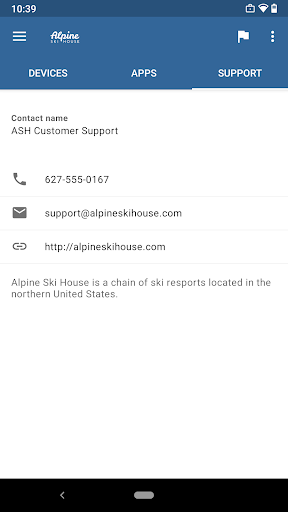
• View IT department contact information
• Change your work account password
• Unenroll or remotely wipe devices

Important: This app requires you to use your work account to enroll in Intune. Some functionality is unavailable in certain countries. If you have issues with this app or questions about its use (including your company’s privacy policy) contact your IT administrator and not Microsoft, your network operator, or your device manufacturer.

https://docs.microsoft.com/Intune/EndUser/using-your-android-device-with-intune

How to uninstall Company Portal:
Before you can uninstall Company Portal, you need to unenroll your device from Intune first. Here are the steps:

1) Follow these directions to unenroll: https://docs.microsoft.com/intune/enduser/unenroll-your-device-from-intune-android
2) Now, you can uninstall Company Portal like you would any other app

सुरक्षा और हस्ताक्षर सत्यापन

यह APK डाउनलोड 100% सुरक्षित है। हम सत्यापित करते हैं कि फ़ाइल का क्रिप्टोग्राफ़िक हस्ताक्षर आधिकारिक डेवलपर क्रेडेंशियल से मेल खाता है। कोई संशोधन या एडवेयर नहीं हैं।

पहचान Basic Access
  • डिवाइस पर खाते ढूंढें
  • खाते जोड़ें या निकालें
संपर्क Basic Access
  • डिवाइस पर खाते ढूंढें
जगह Basic Access
  • अनुमानित स्थान (नेटवर्क-आधारित)
  • सटीक स्थान (GPS और नेटवर्क-आधारित)
फ़ोन Basic Access
  • फ़ोन की स्‍थिति और पहचान पढ़ें
फ़ोटो/मीडिया/फ़ाइलें Basic Access
  • अपने USB स्टोरेज की सामग्री पढ़ें
  • अपने USB स्टोरेज की सामग्री बदलें या मिटाएं
डिवाइस का स्टोरेज Basic Access
  • अपने USB स्टोरेज की सामग्री पढ़ें
  • अपने USB स्टोरेज की सामग्री बदलें या मिटाएं
कैमरा Basic Access
  • चित्र और वीडियो लें
वाई-फ़ाई कनेक्शन की जानकारी Basic Access
  • वाई-फ़ाई कनेक्शन देखें
डिवाइस आईडी और कॉल की जानकारी Basic Access
  • फ़ोन की स्‍थिति और पहचान पढ़ें
अन्‍य Basic Access
  • नेटवर्क कनेक्शन देखें
  • खाते बनाएं और पासवर्ड सेट करें
  • नेटवर्क कनेक्‍टिविटी बदलें
  • वाई-फ़ाई से कनेक्‍ट और डिस्‍कनेक्‍ट करें
  • पूरा नेटवर्क ऐक्सेस
  • अन्‍य ऐप्स बंद करें
  • नियर फ़ील्‍ड कम्‍यूनिकेशन नियंत्रित करें
  • प्रारंभ होने पर चलाएं
  • अन्‍य ऐप्स पर खींचें
  • डिवाइस पर खातों का इस्तेमाल करें
  • डिवाइस को निष्‍क्रिय होने से रोकें
  • समन्‍वयन चालू और बंद टॉगल करें
  • Google सेवा कॉन्फ़िगरेशन पढ़ें