
डाउनलोड स्रोत
Device Configuration
स्प्लिट एपीके (Split APK) स्थापना गाइड
कुछ ऐप्स स्प्लिट एपीके (एक साथ पैक की गई कई .apk फाइलें) के रूप में वितरित किए जाते हैं। मानक एंड्रॉइड इंस्टॉलर उन्हें खोल नहीं सकते हैं।
सम्बन्धित ऐप्स




नया क्या है
We update the Dayforce app as often as possible to ensure the most reliable and enjoyable experience for our users. This release contains the following updates:
• Bug fixes, performance enhancements, and usability improvements.
इस ऐप के बारे में
The Dayforce app helps you do the work you’re meant to do by putting you in charge of your work and life - anytime, anywhere.
With the Dayforce app, staying connected and in control is simple. Skip the paperwork and manage tasks efficiently across your devices.
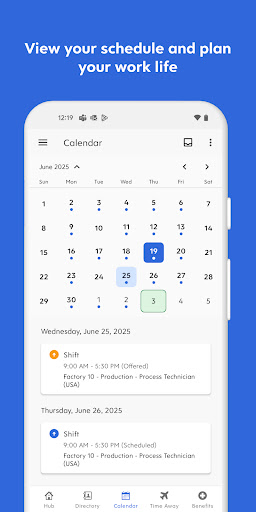
From clocking in and out to planning time off, checking your schedule, swapping shifts, or reviewing benefits, the Dayforce app makes it easy to manage your day-to-day.
You can also track your real-time earnings and access your pay before payday, giving you greater control and flexibility when you need it.¹
Plus, if you’re a people leader, the Dayforce app puts essential manager tools right at your fingertips so you can handle tasks on the go and free up more of your time. Need to approve timesheets or respond to requests? Dayforce makes it simple to stay connected and in control, wherever you are.
Disclaimers:
Features available to you depend on your employer’s setup, and not all features may be available.
Dayforce mobile access is available only to employees of organizations that use Dayforce and have enabled the mobile experience.
¹ Not all employers choose to offer on-demand pay with Dayforce Wallet. Check with your employer to see if this is available to you. Some blackout dates and limitations may apply based on your employer's pay cycle and configurations. Partner banks do not administer and are not responsible for on-demand pay.
Dayforce एपीके कैसे डाउनलोड करें
- APK Downloader होमपेज पर पैकेज नाम
com.dayforce.mobileदर्ज करें। - अपने डिवाइस आर्किटेक्चर का चयन करें (आधुनिक उपकरणों के लिए ARM64 अनुशंसित है)।
- मर्ज की गई एपीके फ़ाइल प्राप्त करने के लिए डाउनलोड पर क्लिक करें।
- एपीके को अपने एंड्रॉइड डिवाइस पर ट्रांसफर और इंस्टॉल करें।
- अपडेट रहें: अपने पसंदीदा ऐप्स के नवीनतम सुरक्षित संस्करणों को खोजने और डाउनलोड करने के लिए नियमित रूप से APK Downloader पर जाएं।
सुरक्षा और हस्ताक्षर सत्यापन
यह APK डाउनलोड 100% सुरक्षित है। हम सत्यापित करते हैं कि फ़ाइल का क्रिप्टोग्राफ़िक हस्ताक्षर आधिकारिक डेवलपर क्रेडेंशियल से मेल खाता है। कोई संशोधन या एडवेयर नहीं हैं।