
डाउनलोड स्रोत
Device Configuration
स्प्लिट एपीके (Split APK) स्थापना गाइड
कुछ ऐप्स स्प्लिट एपीके (एक साथ पैक की गई कई .apk फाइलें) के रूप में वितरित किए जाते हैं। मानक एंड्रॉइड इंस्टॉलर उन्हें खोल नहीं सकते हैं।
सम्बन्धित ऐप्स




नया क्या है
- bug fixes
इस ऐप के बारे में
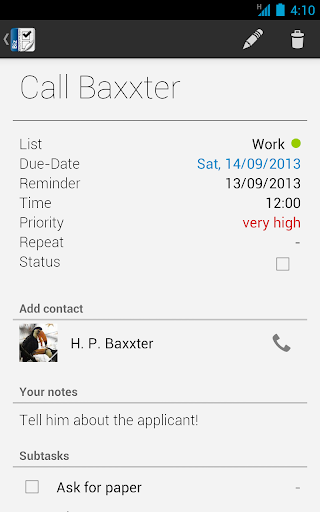
Business Tasks is a complete tasks organizer that is synchronizing with Google Tasks and Toodledo!
The application also works as an add-on for our application Business Calendar (full version) so that all tasks can be viewed and edited from within the calendar app as long as the Business Tasks add-on is installed!
Features:
* Google Tasks functionality on your Android device
* support for Toodledo tasks
* easy and convenient tasks management
* color code task lists
* configurable smartlists to quickly show all tasks that are matching certain criteria
* pre-defined smartlists for today, next 7 days and all tasks
* sort tasks using drag&drop
* repeating tasks
* option to create local tasks
* option to create subtasks
* automatically create tasks for missed calls
* add contacts to tasks
* quick access to favorite task lists
* search function
* reminder for tasks
* postpone tasks to tomorrow with one click
* scrollable widget (Android 3.x+)
* optimized version for tablets (Android 4.x+)
Business Tasks एपीके कैसे डाउनलोड करें
- APK Downloader होमपेज पर पैकेज नाम
com.appgenix.biztasksदर्ज करें। - अपने डिवाइस आर्किटेक्चर का चयन करें (आधुनिक उपकरणों के लिए ARM64 अनुशंसित है)।
- मर्ज की गई एपीके फ़ाइल प्राप्त करने के लिए डाउनलोड पर क्लिक करें।
- एपीके को अपने एंड्रॉइड डिवाइस पर ट्रांसफर और इंस्टॉल करें।
- अपडेट रहें: अपने पसंदीदा ऐप्स के नवीनतम सुरक्षित संस्करणों को खोजने और डाउनलोड करने के लिए नियमित रूप से APK Downloader पर जाएं।
सुरक्षा और हस्ताक्षर सत्यापन
यह APK डाउनलोड 100% सुरक्षित है। हम सत्यापित करते हैं कि फ़ाइल का क्रिप्टोग्राफ़िक हस्ताक्षर आधिकारिक डेवलपर क्रेडेंशियल से मेल खाता है। कोई संशोधन या एडवेयर नहीं हैं।