
डाउनलोड स्रोत
Device Configuration
स्प्लिट एपीके (Split APK) स्थापना गाइड
कुछ ऐप्स स्प्लिट एपीके (एक साथ पैक की गई कई .apk फाइलें) के रूप में वितरित किए जाते हैं। मानक एंड्रॉइड इंस्टॉलर उन्हें खोल नहीं सकते हैं।
सम्बन्धित ऐप्स


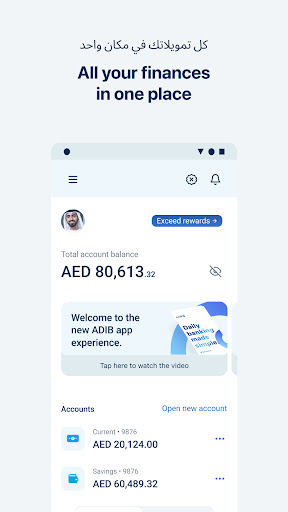


नया क्या है
We’ve made ADIB Mobile even more secure and easier to use.
• Enhanced fraud protection with stronger security controls and improved authentication for selected transactions.
• New card management features giving you greater control over your debit and covered cards.
• Refreshed account experience with easier access to statements and services.
• Personalise your banking by assigning nicknames to your accounts and finance products.
• Performance improvements and bug fixes.
इस ऐप के बारे में
The all-new ADIB Mobile Banking gives you the freedom to manage your money on the go. View all your accounts at a glance, send money to your family & friends, pay your bills, recharge your phone & Salik credit, apply for financing and much more!
Features include:
A timeline of all your account transactions
Transaction detail with a single tap
Ability to temporarily block your card & request for card replacements
Get personal finance from the comfort of your home (if you qualify)
Option to personalize your app with images for accounts
One place for all your payments
Update Emirates ID, Passport, mobile number and email
View your personal, identification and contact details
Transfer money from your ADIB Visa or MasterCard to your account
Pay bills with your Visa / MasterCard
Open a new account
View exchange rates for your foreign currency accounts
Location of all ADIB Branches & ATMs
Register for phone banking, SMS banking and e-statements
Change your Phone Banking ePIN
View your Financing and Card transaction details
Search transactions by entering keywords
View pending transactions
Apply for an ADIB service (Certificates, Chequebooks, etc.)
Improved look & feel
Donate to Red Crescent Sukuk directly within the app
Push notifications – Get offers that you like
Request new products / services directly within the app
View your ADIB Covered card benefits
Log in the app with your Fingerprint
ADIB Mobile Banking एपीके कैसे डाउनलोड करें
- APK Downloader होमपेज पर पैकेज नाम
com.adib.mobileदर्ज करें। - अपने डिवाइस आर्किटेक्चर का चयन करें (आधुनिक उपकरणों के लिए ARM64 अनुशंसित है)।
- मर्ज की गई एपीके फ़ाइल प्राप्त करने के लिए डाउनलोड पर क्लिक करें।
- एपीके को अपने एंड्रॉइड डिवाइस पर ट्रांसफर और इंस्टॉल करें।
- अपडेट रहें: अपने पसंदीदा ऐप्स के नवीनतम सुरक्षित संस्करणों को खोजने और डाउनलोड करने के लिए नियमित रूप से APK Downloader पर जाएं।
सुरक्षा और हस्ताक्षर सत्यापन
यह APK डाउनलोड 100% सुरक्षित है। हम सत्यापित करते हैं कि फ़ाइल का क्रिप्टोग्राफ़िक हस्ताक्षर आधिकारिक डेवलपर क्रेडेंशियल से मेल खाता है। कोई संशोधन या एडवेयर नहीं हैं।