
डाउनलोड स्रोत
Device Configuration
स्प्लिट एपीके (Split APK) स्थापना गाइड
कुछ ऐप्स स्प्लिट एपीके (एक साथ पैक की गई कई .apk फाइलें) के रूप में वितरित किए जाते हैं। मानक एंड्रॉइड इंस्टॉलर उन्हें खोल नहीं सकते हैं।
सम्बन्धित ऐप्स




नया क्या है
Fixed issues with login session handling, document review completion, and proposal calculations.
इस ऐप के बारे में
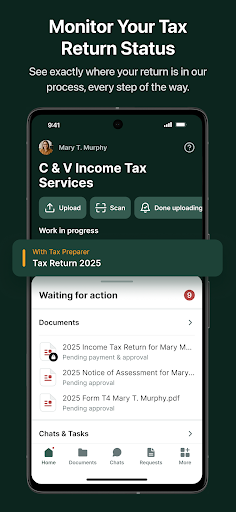
The C & V Income Tax Services App provides our clients with a secure and convenient way to work with our team throughout the income tax preparation process.
Built on TaxDome’s industry-leading security infrastructure, the app protects your personal and financial information with bank-level encryption (in transit and at rest), secure document storage, and advanced authentication safeguards. Your data is always protected in a fully compliant environment.
With the C & V Income Tax Services App, you can:
- Securely scan, upload, and share documents
- Complete required forms with helpful auto-fill features
- Chat with our team through encrypted messaging Track the progress of your tax return in real time
- Review, approve, and electronically sign documents
- Pay invoices quickly and securely
- Access all your documents and past tax returns 24/7, in one place
Designed with simplicity and usability in mind, the mobile experience keeps you organized and connected wherever you are.
For the most secure experience, activate FaceID and enable Two-Factor Authentication (2FA).
C & V Income Tax Services एपीके कैसे डाउनलोड करें
- APK Downloader होमपेज पर पैकेज नाम
ca.cvtax.appदर्ज करें। - अपने डिवाइस आर्किटेक्चर का चयन करें (आधुनिक उपकरणों के लिए ARM64 अनुशंसित है)।
- मर्ज की गई एपीके फ़ाइल प्राप्त करने के लिए डाउनलोड पर क्लिक करें।
- एपीके को अपने एंड्रॉइड डिवाइस पर ट्रांसफर और इंस्टॉल करें।
- अपडेट रहें: अपने पसंदीदा ऐप्स के नवीनतम सुरक्षित संस्करणों को खोजने और डाउनलोड करने के लिए नियमित रूप से APK Downloader पर जाएं।
सुरक्षा और हस्ताक्षर सत्यापन
यह APK डाउनलोड 100% सुरक्षित है। हम सत्यापित करते हैं कि फ़ाइल का क्रिप्टोग्राफ़िक हस्ताक्षर आधिकारिक डेवलपर क्रेडेंशियल से मेल खाता है। कोई संशोधन या एडवेयर नहीं हैं।