
Sources de téléchargement
Device Configuration
Guide d'installation des APKs divisées (Split APKs)
Certaines applications sont distribuées sous forme d'APKs divisées (plusieurs fichiers .apk groupés) pour optimiser les ressources. Les installateurs Android standard ne peuvent pas les ouvrir.
Applications Connexes



À propos de cette application
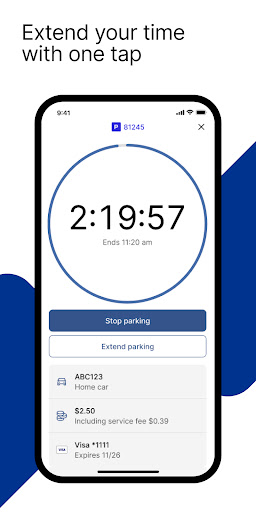
The 717 Parking app, powered by ParkMobile, provides a convenient way to pay for parking in Tampa, St. Petersburg, and Clearwater, Florida, using your mobile device. Registering is free and takes less than two minutes to join. The 717 Parking app takes the stress out of parking. No more searching for coins. No worries about an out-of-service parking meter. With the 717 Parking app, starting your parking session takes just a few seconds. You can use the 717 Parking app in over 500 other cities across the country, including New York, San Francisco, Washington, D.C., Atlanta, Chicago, Miami, New Orleans, Dallas, St. Louis, Minneapolis, Pittsburgh, Philadelphia, and more.
Why Use the 717 Parking app?
• Skip the meter and easily pay for parking from your mobile device
• Extend your parking duration remotely from the app
• Get alerts so you know when your parking session is going to expire
• Track parking expenses and easily export for expense reimbursements
•. Reserve parking spots ahead of time to save time and money
How to Set Up Your Account
• Download the 717 Parking app and create an account with your email address and password
• Enter your license plate number and the state where your vehicle is registered
• Add your method of payment and start using the 717 Parking app
How It Works:
• Streets, Lots, and Garages: Enter the zone number on the posted signs in your area. Select the amount of time you want to park, and start your session. Extend time in the app if you are running late.
• Parking Reservations: Search for where you want to park and select the specific parking facility. Choose the date/time and complete your reservation. Follow the instructions in your confirmation to redeem at the parking facility.
App Features
• Customizable notifications delivered via email, text, and/or app
• Save your favorite parking locations for next time
• Store up to five cars in your account
• “Find my car” feature directs you back to the location where you parked
• Multiple payment methods available
About ParkMobile
ParkMobile, LLC is the leading provider of parking payment solutions in the United States, helping over 25 million people easily find, reserve, and pay for parking from their mobile devices.
Looking for Help?
At ParkMobile, we’re serious about customer service. We process over 350,000 parking transactions every day and we know that every now and then, something might go wrong. If you have an issue, we will do everything we can to make it right. Our customer service is 24/7/365. If you need help, here’s how to get in touch with us:
Web: https://ParkMobile.io/
Online Help Center: https://support.ParkMobile.io/hc/en-us/requests/new
Video Tutorials: https://ParkMobile.io/tips-demos/
Twitter: https://twitter.com/ParkMobile
Facebook: https://www.facebook.com/ParkMobile/
Comment télécharger l'APK de 717 Parking
- Entrez le nom du paquet
net.sharewire.parking717sur la page d'accueil d'APK Downloader. - Sélectionnez l'architecture de votre appareil (ARM64 recommandé pour les appareils récents).
- Cliquez sur Télécharger pour obtenir le fichier APK fusionné.
- Transférez et installez l'APK sur votre appareil Android.
- Restez à jour: Visitez régulièrement APK Downloader pour rechercher et télécharger les dernières versions sécurisées de vos applications préférées.
Sécurité et Vérification de Signature
Ce téléchargement APK est 100% sûr. Nous vérifions que la signature cryptographique du fichier correspond aux informations d'identification officielles du développeur. Aucune modification ni adware n'est injecté.