
Sources de téléchargement
Device Configuration
Guide d'installation des APKs divisées (Split APKs)
Certaines applications sont distribuées sous forme d'APKs divisées (plusieurs fichiers .apk groupés) pour optimiser les ressources. Les installateurs Android standard ne peuvent pas les ouvrir.
Applications Connexes




Nouveautés
Performance & Improvements
• General performance enhancements
• Bug fixes and stability improvements
À propos de cette application
FYI is an AI-powered productivity tool designed to serve the creative community and beyond— finally an all-encompassing tool for the ones who drive culture forward.
On FYI, you can:
• ORGANIZE your creative work into Projects and turn on “AI in Projects” to improve your workflow.
• GENERATE TEXT and IMAGES with FYI.AI, your creative co-pilot
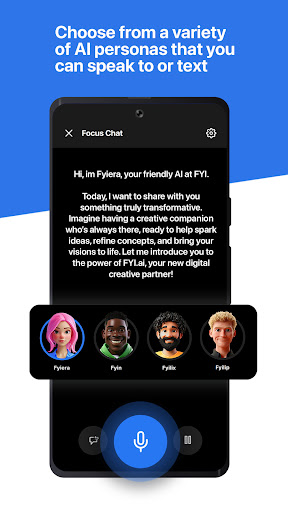
• CUSTOMIZE YOUR FYI.AI by selecting from various AI voice personas
• LISTEN TO RAiDiO.FYI, AI-powered interactive music stations
• CHAT and SHARE FILES with collaborators and team members
• MAKE VIDEO CALLS while sharing content on the screen
• SECURE YOUR DATA with the most advanced end-to-end encryption
• PRESENT your work in beautiful, interactive layouts – ALL IN ONE APP
Use FYI to:
BUILD PROJECTS. Organize your work into Projects by adding photos, videos, documents, or any assets you want to keep track of or manage. A Project can be a design portfolio, a pitch deck, a collaborative workspace, or even your personal archives. Share Projects with your team and assign editor roles. Control access settings to make your Projects private or public. Then, use Projects as a new way of sharing content with the world. Public projects have customizable links and can be viewed on any web browser.
TURBOCHARGE YOUR CREATIVITY with FYI.AI. Ask FYI.AI to draft stories, song lyrics, blog posts, marketing copy, or any creative content - and see the results within seconds. Use the AI Art tool to generate images. Choose from a variety of AI voice personas to customize your experience. Riff with FYI.AI naturally like a member of your own creative team. With FYI.AI, you can ideate faster than ever before and turbocharge your creative output. You can now turn on “AI in Projects” to enhance your workflows.
MAKE "CONTENT CALLS" AND STAY IN SYNC WITH YOUR TEAM. Launch audio or video calls with up to 8 participants from any piece of media content within the app. Use "SYNC MODE" to control the screen for other viewers, and have them synced with your every move as you collaborate. Use Content Calls for working sessions with your team, give interactive presentations, or even turn group calls into album listening parties.
ACCESS A DEEPER CALL HISTORY. Ever been presented with a deck on a conference call, only to lose it after the call ends? Not with FYI—your app automatically saves all files shared on a call in your private history, so you can access them again any time. Just tap on a “CALL CARD" in your chat thread, or access it from your call logs. No need to ever send a follow-up message for that missing pitch, mp3 or doc!
SECURE YOUR DATA. As a creative, your content is your livelihood, and it deserves the utmost protection. Everything on FYI including chats, projects, and calls is encrypted using ECDSA and ECDHE, the same cryptography methods used in securing blockchain transactions. ONLY YOU have access to your private key – no one else, not even FYI.
FOCUS YOUR IDEAS. FYI empowers teams to stay focused and be more productive in a remote modern society. We build features to make every user a power user. Voice notes are transcribed, searchable and interactive. Send messages in any language, and we’ll translate it for you. Never lose track of important information.
Comment télécharger l'APK de FYI.AI
- Entrez le nom du paquet
com.xuper.chat.appsur la page d'accueil d'APK Downloader. - Sélectionnez l'architecture de votre appareil (ARM64 recommandé pour les appareils récents).
- Cliquez sur Télécharger pour obtenir le fichier APK fusionné.
- Transférez et installez l'APK sur votre appareil Android.
- Restez à jour: Visitez régulièrement APK Downloader pour rechercher et télécharger les dernières versions sécurisées de vos applications préférées.
Sécurité et Vérification de Signature
Ce téléchargement APK est 100% sûr. Nous vérifions que la signature cryptographique du fichier correspond aux informations d'identification officielles du développeur. Aucune modification ni adware n'est injecté.