
Sources de téléchargement
Device Configuration
Guide d'installation des APKs divisées (Split APKs)
Certaines applications sont distribuées sous forme d'APKs divisées (plusieurs fichiers .apk groupés) pour optimiser les ressources. Les installateurs Android standard ne peuvent pas les ouvrir.
Applications Connexes




Nouveautés
Bug fixes and enhancements.
À propos de cette application
To all USPS Mobile® app customers, we recommend downloading the updated USPS Mobile® application. This USPS Mobile® application was created to be compatible with newer Android phones. We have also fixed bugs within the app. To receive updates to your USPS Mobile® app, please download the app here.
Access popular USPS.com® tools on the go with the “USPS Mobile®” app: calculate shipping prices (limitations apply), find a Post Office ™, look up a ZIP Code™, schedule a next-day pickup, request USPS to hold your mail, access Informed Delivery® to track packages and digitally preview incoming mail, and more.
• Check the status of shipments sent using Priority Mail®, Priority Mail Express®, Certified Mail®, and certain other delivery services. Nickname your shipments and sign up for text and email alerts to notify you of the delivery status.
• Calculate a Domestic or International Price to determine how much postage you will need when you ship a letter, card, large envelope, or package (limitations apply). Choose retail or online pricing, add any extra services you need, and view the total, too.
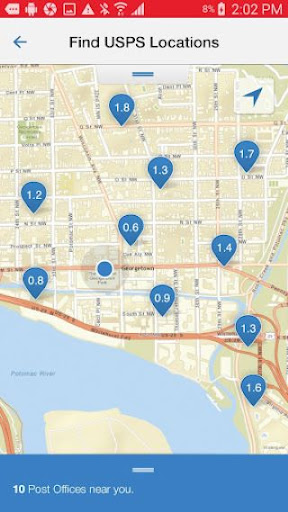
• Find USPS® Locations when you need to get to a Post Office™, Self-Service Kiosk (APC®) or collection box with an easy-to-filter locator. The USPS Mobile app uses your device’s GPS to show your closest options on a map, along with their Regular Hours, Special Hours and Last Collection Times, and provides mapped results with driving, walking, or transit directions.
• Look up a ZIP Code™ for any U.S. or Canadian address.
• Schedule a free next-day pickup and have your Letter Carrier pick up Priority Mail®, Priority Mail Express®, Global Express Guaranteed®, or Merchandise Return Services shipments from your home or office during regular mail delivery.
• Request Hold Mail Service while you’re away, and we’ll keep your mail at your local Post Office™ for you to pick up or be delivered by your carrier when you return.
• Scan the barcode on shipping labels with your device’s camera. The app recognizes the shipment and stores the label number, so you can stay on top of delivery status.
• Link to Informed Delivery to track packages and digitally preview your household’s incoming mail arriving soon; view grayscale images of the exterior, address side of letter-sized mailpieces.
Comment télécharger l'APK de USPS MOBILE®
- Entrez le nom du paquet
com.usps.appsur la page d'accueil d'APK Downloader. - Sélectionnez l'architecture de votre appareil (ARM64 recommandé pour les appareils récents).
- Cliquez sur Télécharger pour obtenir le fichier APK fusionné.
- Transférez et installez l'APK sur votre appareil Android.
- Restez à jour: Visitez régulièrement APK Downloader pour rechercher et télécharger les dernières versions sécurisées de vos applications préférées.
Sécurité et Vérification de Signature
Ce téléchargement APK est 100% sûr. Nous vérifions que la signature cryptographique du fichier correspond aux informations d'identification officielles du développeur. Aucune modification ni adware n'est injecté.