
Sources de téléchargement
Device Configuration
Guide d'installation des APKs divisées (Split APKs)
Certaines applications sont distribuées sous forme d'APKs divisées (plusieurs fichiers .apk groupés) pour optimiser les ressources. Les installateurs Android standard ne peuvent pas les ouvrir.
Applications Connexes


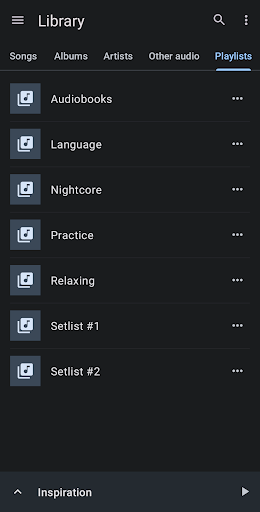


Nouveautés
Added support for audio playback of MKV files.
À propos de cette application
Music Speed Changer allows you to change the speed of audio files on your device in real time without affecting the pitch (time stretch), or change the pitch without changing the speed (pitch shift). Alternatively, both speed and pitch may be adjusted together with a single control. The app is a music looper as well - you can slow down song speed and loop sections of the music for easy practice.
You can also save the adjusted audio to an MP3, FLAC, or WAV audio file for sharing with friends or listening in another player.
Music Speed Changer is great for musicians practicing an instrument needing to slow down the tempo or practice in a different tuning, speeding up audio books for faster listening, making nightcore or just rocking out to your favorite song at 130%.
Features:
-Pitch shifting - change song pitch up or down 24 semi-tones, with fractional semi-tones allowed. Range of modification may be adjusted in the app's Settings.
-Time stretching - change audio speed from 15% to 500% of original speed (change BPM of music). Range of modification may be adjusted in the app's Settings.
-Utilizes professional quality time stretching and pitch shift engine.
-Formant correction for more natural sounding vocals while pitch shifting (Pro feature, requires in-app purchase or subscription).
-Rate adjustment - change the pitch and tempo of the audio together.
-Opens most audio file formats.
-Music looper - seamlessly loop audio sections and practice over and over (AB repeat play).
-Advanced looping feature - move the loop to the next or previous measure or set of measures with the touch of a button after the perfect loop is captured.
-Reverse music (play backwards). Decode the secret message or learn a passage backwards and forwards.
-Playing queue - add folder or album to the playing queue and add/remove individual tracks.
-Waveform view showing contours of the audio for precise seeking.
-Equalizer - 8-band graphic equalizer, and preamp and balance control.
-Analyze the audio to display the BPM and musical key of each track.
-Markers - bookmark positions in your audio.
-Audio effects - apply effects such as echo, flanger and reverb, or reduce the vocal levels in the music for a karaoke effect.
-Audio separation - Track splitter and track isolation features separate or remove vocals, drums, bass, and other instruments in any song (feature requires a device with 4 GB or more RAM, and 64-bit Android OS).
-Great for making Nightcore or Fast Music creations.
-Export your adjustments to a new audio file. File format and quality may be adjusted in the app's Settings.
-Save an altered version of the whole track or only the captured loop section (excellent for making unique ringtones).
-Modern material design UI and simple to use.
-Light and dark themes.
-Built-in audio recorder.
-Free and unrestricted music speed controller (formant correction feature requires in-app purchase or subscription).
-No waiting for your local audio file to decode, instant playback and instant audio speed and pitch adjustment.
Comment télécharger l'APK de Music Speed Changer
- Entrez le nom du paquet
com.smp.musicspeedsur la page d'accueil d'APK Downloader. - Sélectionnez l'architecture de votre appareil (ARM64 recommandé pour les appareils récents).
- Cliquez sur Télécharger pour obtenir le fichier APK fusionné.
- Transférez et installez l'APK sur votre appareil Android.
- Restez à jour: Visitez régulièrement APK Downloader pour rechercher et télécharger les dernières versions sécurisées de vos applications préférées.
Sécurité et Vérification de Signature
Ce téléchargement APK est 100% sûr. Nous vérifions que la signature cryptographique du fichier correspond aux informations d'identification officielles du développeur. Aucune modification ni adware n'est injecté.