
Sources de téléchargement
Device Configuration
Guide d'installation des APKs divisées (Split APKs)
Certaines applications sont distribuées sous forme d'APKs divisées (plusieurs fichiers .apk groupés) pour optimiser les ressources. Les installateurs Android standard ne peuvent pas les ouvrir.
Applications Connexes




Nouveautés
- RV2800/RV2900: Improved robot status reliability and consistency
- RV2800/RV2900: Improved map display and carpet detection during editing
- RV2800/RV2900: Improved Bluetooth connection stability
- RV2700: Improved mission status display and notifications
- Added Simplified Chinese language support
- General performance improvements and bug fixes
À propos de cette application
Meet Your Ultimate Cleaning Companion
Use the SharkClean® to schedule cleans, customize maps, set no-go zones, monitor performance, and more. Whether you're at home, at work, or on vacation, your floors will stay effortlessly clean.
Key Features:
UV Stain Detect™: Illuminates invisible stuck-on messes to see what you can't and cleans what other robots don't. After each run, the robot automatically revisits each detect spot to make sure nothing was left behind. (PowerDetect UV Reveal only)
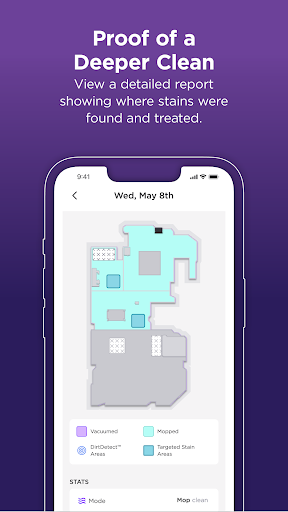
Proof of a deeper clean: View a detailed report showing where stains were found and targeted. (PowerDetect UV Reveal only)
Spot cleaning: Don't need a whole-home clean? Send your robot to directly target a specific mess.
Custom power and water flows: You can choose the power and water flow levels that work best for your home.
Live robot tracking: See exactly where your robot is cleaning whenever you want.
Schedule cleans by room: You pick when and where, then the robot handles the rest.
Smart home linking: Easily connect to Alexa or Google Home and start cleaning with voice commands.
Requirements:
Shark® Wi-Fi-Connected Robotic Vacuum
Models supported: 700, 800, 900, 1000, 2000, 2100 (Navigator), 2300 (Matrix), 2400 (Matrix 2-in-1), 2500 (AI Ultra), 2600 (Matrix Plus 2-In-1), 2700 (Stratos), 2800 (PowerDetect, PowerDetect 2-in-1), 2900 (PowerDetect ThermaCharged), 3000 (UV Reveal PowerDetect).
Wi-Fi with 2.4GHz band support.
Supported OS:
Android 8, 9, 10, 11, 12, 13, 14, 15 & 16
For U.S. support, visit SharkNinja | Home Appliances, Cleaning Solutions, Beauty & More for additional information.
For E.U. support, visit Shark Clean for additional information.
*Google is a trademark of Google LLC.
**Alexa is a trademark of Amazon LLC.
Comment télécharger l'APK de SharkClean
- Entrez le nom du paquet
com.sharkninja.sharksur la page d'accueil d'APK Downloader. - Sélectionnez l'architecture de votre appareil (ARM64 recommandé pour les appareils récents).
- Cliquez sur Télécharger pour obtenir le fichier APK fusionné.
- Transférez et installez l'APK sur votre appareil Android.
- Restez à jour: Visitez régulièrement APK Downloader pour rechercher et télécharger les dernières versions sécurisées de vos applications préférées.
Sécurité et Vérification de Signature
Ce téléchargement APK est 100% sûr. Nous vérifions que la signature cryptographique du fichier correspond aux informations d'identification officielles du développeur. Aucune modification ni adware n'est injecté.