
Sources de téléchargement
Device Configuration
Guide d'installation des APKs divisées (Split APKs)
Certaines applications sont distribuées sous forme d'APKs divisées (plusieurs fichiers .apk groupés) pour optimiser les ressources. Les installateurs Android standard ne peuvent pas les ouvrir.
Applications Connexes





Nouveautés
1. App Mode now allows you to customize website domains, not just apps! Connect any website domain to your desired VPN location!
À propos de cette application
SafeShell VPN provides unlimited, high-speed VPN access through a secure global network. Enjoy private and seamless browsing without speed limits, anytime, anywhere.
SafeShell revolutionizes VPN with a personalized connection experience! Our exclusive App Mode allows you to connect different apps to different regions simultaneously. Whether you're working, browsing, or staying in touch across borders — SafeShell gives you peace of mind. Compatible with iPhone, iPad, Mac, Apple TV, and Apple Vision Pro!
SafeShell VPN's brand new subtitle translation feature supports translation in 30+ languages, allowing you to watch your favourite content in a language that speaks to your heart. Original subtitles and translated subtitles are displayed side by side, allowing you to watch with ease!
Experience SafeShell now and discover a new realm of online freedom, compatible with iPhone, iPad, Mac, Apple TV, and Apple Vision Pro!
- App Mode
SafeShell's exclusive patented technology enables simultaneous apps to multiple regions, allowing a personalized, convenient experience
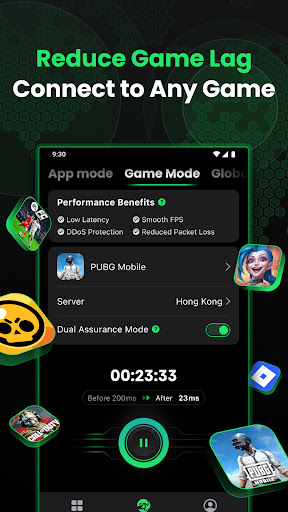
- Game Mode, built for Gaming
Using optimized routes to game servers for low latency and faster responses, stabilizing connections for smoother FPS, hiding your real IP for better DDoS protection, and improving network routing to reduce packet loss and in-game lag.
- Stay Secure with Hidden IP
Protect your personal information and online activities from hackers and surveillance, ensuring anonymity with hidden IP addresses and location protection.
- Public Wi-Fi Protection
Ensure the security of your data when using public Wi-Fi networks.
- Zero Logs Policy
Rest assured, knowing that no online activities or connection logs are stored for maximum privacy.
- Free Trial & Subscription
Try before you buy with a free trial and flexible subscription options.
If you’re enjoying a free trial, you will be charged on the last day of your free trial.
Your subscription will renew automatically at the end of each billing cycle, unless canceled at least 24 hours before the expiration date.
Easily manage your subscription and cancel anytime through your App Store account settings.
Purchasing a subscription will result in the forfeiture of any unused portion of a free trial period, if applicable.
You are welcome to read Subscription Terms here: https://www.safeshellvpn.com/license/Subscription-Terms.html
Privacy Policy: https://www.safeshellvpn.com/license/Privacy-Policy.html
User Agreement: https://www.safeshellvpn.com/license/User-Agreement.html
Terms of Use (EULA): https://www.apple.com/legal/internet-services/itunes/dev/stdeula/
Visit our official website for more detailed information: https://www.safeshellvpn.com/
For any inquiries or technical support, contact our dedicated team:
Email: support@safeshellvpn.com
Telegram: @safeshellvpn
Comment télécharger l'APK de SafeShell VPN: Fast & Secure
- Entrez le nom du paquet
com.safeshellvpnsur la page d'accueil d'APK Downloader. - Sélectionnez l'architecture de votre appareil (ARM64 recommandé pour les appareils récents).
- Cliquez sur Télécharger pour obtenir le fichier APK fusionné.
- Transférez et installez l'APK sur votre appareil Android.
- Restez à jour: Visitez régulièrement APK Downloader pour rechercher et télécharger les dernières versions sécurisées de vos applications préférées.
Sécurité et Vérification de Signature
Ce téléchargement APK est 100% sûr. Nous vérifions que la signature cryptographique du fichier correspond aux informations d'identification officielles du développeur. Aucune modification ni adware n'est injecté.