
Sources de téléchargement
Device Configuration
Guide d'installation des APKs divisées (Split APKs)
Certaines applications sont distribuées sous forme d'APKs divisées (plusieurs fichiers .apk groupés) pour optimiser les ressources. Les installateurs Android standard ne peuvent pas les ouvrir.
Applications Connexes




Nouveautés
• Pinned favorite apps with manually sorting
• Notification when launching games for instant return to The Arcade (optional)
• Collection option for showing/hiding "Add apps" icon in game library
À propos de cette application
🕹️👾💎🧙✨
THE ARCADE
The Arcade is a stand-alone and immersive game hub and game launcher, without sponsored content, where you build your own personal space for gaming. It offers a polished, simple, and customizable interface inspired by the menus on gaming consoles. Your games are automatically organized into clean libraries, letting you clear the clutter from your home screen and enjoy your installed games and emulated ROMs through the entire gaming flow.
All screenshots are captured on real devices using freely downloaded games from Google Play Store.
KEY FEATURES
🔹Automatic game detection and organization
All your games are instantly organized into one dedicated video game hub.
🔹Clean, console-style user interface
Lightweight, simple, fast, and smooth console launcher with game controller support.
🔹No ads, no bloat, no junk
Focused on great gaming — not ads or sponsored content.
🔹Include any app in your gaming hub
Add mobile games, social apps, emulator games, cloud gaming apps — any Play Store app.
🔹Game collections and app folders
Create custom and expressive collections to organize, play, and showcase your games.
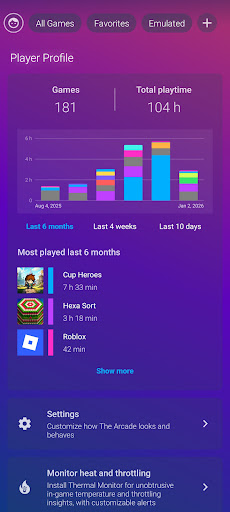
🔹Playtime insights
Track your most played games and how much time you spend in each one.
🔹Landscape & portrait modes
The game launcher works seamlessly in both landscape and portrait modes.
🔹Personalize your gaming hub
Customize icon grids, cover art, backgrounds, labels, themes, sorting, and music.
🔹Emulator frontend
Add emulator games and ROMs directly into your game collections using installed and supported console emulators.
🔹Real-time performance monitoring
Monitor device temperature, thermal throttling, CPU, RAM and battery usage to stay aware while gaming.
🔹Built for privacy and battery-friendly use
Requires minimal system resources, no internet connection, and protects your data.
Emulated games and supported console emulators
You can add video game ROMs into a mix of installed and emulated games in your library with compatible emulator apps (needs to be installed separately).
The Arcade currently supports the following platforms/emulators:
• PlayStation PSP (PPSSPP)
• Nintendo Switch (Eden)
• Game Boy Color & Advance (GBA.emu & GBC.emu)
• Super Nintendo SNES (Snes9X EX+)
• Nintendo NES (NES.emu)
About game performance & "game boosters"
The Arcade does not alter game performance, frame rates (FPS), hardware behavior or network latency. Claims made by many game booster apps are technically impossible! Instead, The Arcade improves your gaming experience through its console launcher interface, focused game hub organization, and ad-free design.
Pre-installed game hubs & sponsored content
If you are used to Samsung Gaming Hub (Game Hub), Xiaomi Game Turbo, Game Space, Game Enhancer, or Game Mode, you'll feel right at home — but now with a game hub and game launcher without ads or sponsored content, available on all Android phone, tablet and Android TV devices with Google Play Store!
Game on!
Comment télécharger l'APK de The Arcade · Game Hub Launcher
- Entrez le nom du paquet
com.rollerbush.gamessur la page d'accueil d'APK Downloader. - Sélectionnez l'architecture de votre appareil (ARM64 recommandé pour les appareils récents).
- Cliquez sur Télécharger pour obtenir le fichier APK fusionné.
- Transférez et installez l'APK sur votre appareil Android.
- Restez à jour: Visitez régulièrement APK Downloader pour rechercher et télécharger les dernières versions sécurisées de vos applications préférées.
Sécurité et Vérification de Signature
Ce téléchargement APK est 100% sûr. Nous vérifions que la signature cryptographique du fichier correspond aux informations d'identification officielles du développeur. Aucune modification ni adware n'est injecté.