
Sources de téléchargement
Device Configuration
Guide d'installation des APKs divisées (Split APKs)
Certaines applications sont distribuées sous forme d'APKs divisées (plusieurs fichiers .apk groupés) pour optimiser les ressources. Les installateurs Android standard ne peuvent pas les ouvrir.
Applications Connexes


Nouveautés
Minor bug fixes and updates for compatibility with the latest versions of Android
À propos de cette application
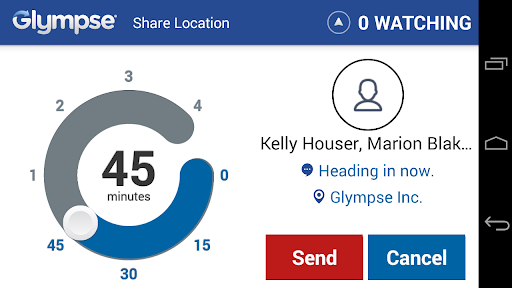
Glympse for Auto is the fastest and easiest way to share your location to friends and family from your car. Using your Favorites and History from the Glympse app, Glympse for Auto incorporates large buttons to allows users to quickly share their location. Let the important people your life know you're on your way using Glympse.
As an add-on to Glympse app, Glympse for Auto integrates with VW and Peugeot Mirrorlink compatible in-dash units as well devices with Pioneer App Radio. Full compatibility with all Mirrorlink devices soon, and more providers to come.
We value our customers feedback and have implemented landscape mode and large buttons for ease of use. Why text when you can just hop in your car and with a touch of a button let your friends and family know you're on your way. Your friends and family will be able to track your location in REAL TIME on a map without having to install the application.
Easy and convenient, download Glympse for Auto today!
App Features:
✓ Easy: no sign up required
✓ Safe: your Glympse automatically expires
✓ Live: share location in real-time with dynamic map
✓ Open: share with anyone – no app required to view
✓ Passive: runs in the background
✓ Global: works anywhere you have GPS and a data connection
Use Glympse for Auto to:
✓ Share your road trip with family and friends
✓ Let your spouse know your ETA on your way home from work
✓ Provide a courtesy notice with ETA to a client or customer appointment when stuck in traffic
✓ Direct emergency personnel to you quickly
Note about PERMISSIONS: If you have any questions about which Android permissions we require or how we use them, please visit... http://glympse.com/perms
We'd love to hear what you think, so please email us at support@glympse.com with any questions, feedback or comments.
Comment télécharger l'APK de Glympse for Auto - Share GPS
- Entrez le nom du paquet
com.glympse.android.autosur la page d'accueil d'APK Downloader. - Sélectionnez l'architecture de votre appareil (ARM64 recommandé pour les appareils récents).
- Cliquez sur Télécharger pour obtenir le fichier APK fusionné.
- Transférez et installez l'APK sur votre appareil Android.
- Restez à jour: Visitez régulièrement APK Downloader pour rechercher et télécharger les dernières versions sécurisées de vos applications préférées.
Sécurité et Vérification de Signature
Ce téléchargement APK est 100% sûr. Nous vérifions que la signature cryptographique du fichier correspond aux informations d'identification officielles du développeur. Aucune modification ni adware n'est injecté.