
Sources de téléchargement
Device Configuration
Guide d'installation des APKs divisées (Split APKs)
Certaines applications sont distribuées sous forme d'APKs divisées (plusieurs fichiers .apk groupés) pour optimiser les ressources. Les installateurs Android standard ne peuvent pas les ouvrir.
Applications Connexes



Nouveautés
Finnair Plus communication preferences have been updated. You can find a link in the account settings to manage them in our privacy portal. In addition, you can now add group bookings in the app.
À propos de cette application
The Finnair app is a travel companion designed to give you peace of mind throughout your journeys, from preparing for the flight to landing at the destination.
CHECK-IN AND BOARDING PASS
You can check-in to your flights to most destinations and keep your boarding pass in your app.
FLIGHT INFORMATION
Get notified of boarding, delays and other important moments during your journey. Your flight details are also kept in the app, from baggage allowance to diet restrictions.
UPGRADE YOUR EXPERIENCE
We offer Business class upgrades, Economy Comfort seats and other extra services through the app, so you can customise the flight to your needs. You can pay with credit card, vouchers or Finnair Plus points.
BOOK FLIGHTS
Discover new destinations and deals through the Finnair app and automatically add the flights to your app.
ACCESS FINNAIR PLUS
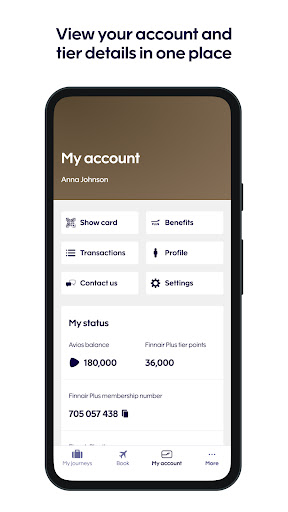
Keep an eye on your Finnair Plus points, recent transaction and check tier benefits. By adding the flight to app while logged in, you ensure that you get all the points you're entitled to. Remember to join Finnair Plus if you're not a member yet - or use the app anonymously if you wish.
CUSTOMER CARE
Get in touch with our customer care experts through the call centre or Facebook Messenger.
AIRPORT SERVICES
Check the terminal maps through the app. When you arrive to Helsinki-Vantaa airport, we'll let you know where to find your luggage.
We are continuously working on new features to support you during your travels.
Comment télécharger l'APK de Finnair
- Entrez le nom du paquet
com.finnairsur la page d'accueil d'APK Downloader. - Sélectionnez l'architecture de votre appareil (ARM64 recommandé pour les appareils récents).
- Cliquez sur Télécharger pour obtenir le fichier APK fusionné.
- Transférez et installez l'APK sur votre appareil Android.
- Restez à jour: Visitez régulièrement APK Downloader pour rechercher et télécharger les dernières versions sécurisées de vos applications préférées.
Sécurité et Vérification de Signature
Ce téléchargement APK est 100% sûr. Nous vérifions que la signature cryptographique du fichier correspond aux informations d'identification officielles du développeur. Aucune modification ni adware n'est injecté.