
Sources de téléchargement
Device Configuration
Guide d'installation des APKs divisées (Split APKs)
Certaines applications sont distribuées sous forme d'APKs divisées (plusieurs fichiers .apk groupés) pour optimiser les ressources. Les installateurs Android standard ne peuvent pas les ouvrir.
Applications Connexes




Nouveautés
- Improved subscription management for a smoother experience across the app.
- Performance improvements and issue fixes
À propos de cette application
Have you ever looked at your overflowing inbox and groaned? Struggled to manage multiple email accounts overloaded with spam? Wished for an easy way to clean your inbox?
If any of these situations sound familiar, Edison Mail is the answer to your struggles. Built from the ground up, our mission is to equip you with the easiest way to cut time wasted in email so you do more of what you love. Edison Mail is the best email app for Android, we give you the power to stress less, save time, and stop unwanted email once and for all. Edison Mail for Android just works. It’s simple, user friendly, and ready to use the moment you download.
Whether you’re looking to tackle 1 email account or 20, Edison Mail offers the unified inbox experience to empower you get through everything on your plate.
Google Play Store 2017 Android Excellence Program Winner
TheVerge - “The fastest email app around...”
TechCrunch- “…like you’ve given the mail app an upgrade…”
CNET- “…imposes order on an unruly inbox…”
Reduce email volume and eliminate inbox distractions
You’ve likely wasted as many as 21 minutes per day checking your email. Edison Mail for Android gives you the power to manage and clean your inbox at light speed.
Edison Mail fetches email faster than other mail apps (we have the speed tests to prove it) and simplifies searching for important information like subscriptions, travel plans, bills, packages, and more. With Edison Mail in your arsenal, you can slash through your inbox in a fraction of the time.
Manage everything in one place
No more wasted time juggling or hopping from app to app with this email app.
Edison Mail allows you to connect an unlimited number of email accounts and offers a unified inbox that keeps all of your inboxes in one view. We support all the major providers — Outlook, Yahoo, Hotmail, iCloud, Office/ Outlook 365, Exchange, AOL, Gmail, and IMAP* mail accounts on your Android device.
Mail, the way it should be. Yours.
Nobody emails the same way— you can customize Edison Mail to fit your inbox needs.
Change swipe actions, create custom templates, change the color settings, enable or disable Focused Inbox, and more.
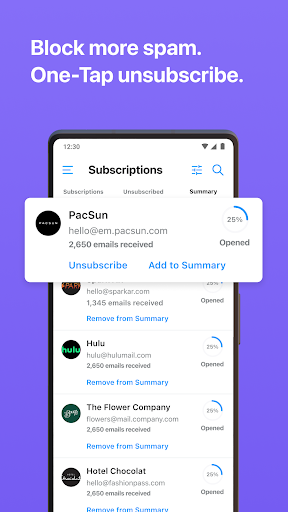
From the Pioneers of One-Tap Unsubscribe
You get control over who’s allowed into your inbox and have the power to avoid dangerous phishing scams.
Block senders to banish unwanted senders permanently. No targeted ads or invasive tracking pixels are allowed into your inbox. Secure your inbox even further from the dangers of email phishing scams with Edison Mail+. Edison Mail for Android is the email app that helps keep your device secure.
Life just got easier with the best email app for Android.
Download Edison Mail today. It just works.
–
*Support for Exchange 2010 Service Pack 2 and above.
**Please note select assistant features (i.e. bill and receipts, entertainment, travel, and package alerts) are currently limited to US and UK only.
Please send us your feature requests and feedback at mailsupport@edison.tech.
Special thanks to everyone who rates us 5 stars, or leaves kudos!
Privacy By Design is Our Promise to Our Users
All emails are fetched from your phone and stored on your device directly. We access new email subject headers (deleted thereafter), required to send notifications of an email arrival. Only commercial emails (example: receipts, Travel, Package Delivery) are stored to deliver Edison Mail Assistant features built into the Email app and Edison Trends. Personal information like your name or email address is NEVER shared. If you’d prefer to opt-out of participating in our anonymized research, you can do so in the settings menu.
Edison Mail+
An auto-renewable premium subscription that offers more advanced email experience, particularly in the areas of contact management and security, for 14.99 USD / Month or 99.99 USD / Year. Subscriptions will automatically renew unless canceled within 24-hours before the end of the current period.
Comment télécharger l'APK de Email - Fast & Secure Mail
- Entrez le nom du paquet
com.easilydo.mailsur la page d'accueil d'APK Downloader. - Sélectionnez l'architecture de votre appareil (ARM64 recommandé pour les appareils récents).
- Cliquez sur Télécharger pour obtenir le fichier APK fusionné.
- Transférez et installez l'APK sur votre appareil Android.
- Restez à jour: Visitez régulièrement APK Downloader pour rechercher et télécharger les dernières versions sécurisées de vos applications préférées.
Sécurité et Vérification de Signature
Ce téléchargement APK est 100% sûr. Nous vérifions que la signature cryptographique du fichier correspond aux informations d'identification officielles du développeur. Aucune modification ni adware n'est injecté.