
Sources de téléchargement
Device Configuration
Guide d'installation des APKs divisées (Split APKs)
Certaines applications sont distribuées sous forme d'APKs divisées (plusieurs fichiers .apk groupés) pour optimiser les ressources. Les installateurs Android standard ne peuvent pas les ouvrir.
Applications Connexes




Nouveautés
V7.3.10 Release Notes:
1.Brand new 3D preview feature;
2.New direct messaging function;
3.Profile optimization, FlowPrint adds Insight;
4.Known bug fixes.
À propos de cette application
Creality Cloud App
Creality Cloud – The Ultimate 3D Printing Platform
Unleash Your Creativity with the World's Leading 3D Printing Community
Creality Cloud is the all-in-one 3D printing platform built for makers, hobbyists, and professionals. Join a thriving global community of over 4 million users and explore a vast 3D model library, AI-powered tools, and seamless built-in cloud slicing. Manage your prints remotely, connect with fellow creators, and bring your ideas to life—all in one powerful app.
Key Features
💡 Earn Rewards & Grow as a Designer
- Earn points when your models are downloaded, sliced, or printed, and redeem them for exciting rewards.
- Receive boosts from active users with platform-issued boost tickets.
- Set your own prices for paid models and offer discounts to boost sales.
- AI-powered upload assistant helps you tag, categorize, and describe models more efficiently.
- Enhanced dashboard - Insights provides real-time updates on model performance, fan interactions, and earnings.
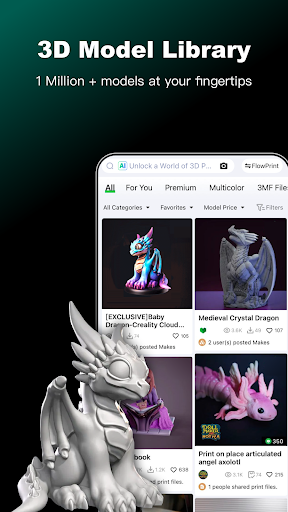
📌 Explore a Vast 3D Model Library
- Browse millions of high-quality 3D models, including thousands of free designs ready for download and printing.
- AI-powered search helps you find models faster with image-based search and semantic search.
- Discover trending, exclusive, and premium models, curated just for you.
- Join themed design contests and showcase your creativity to the world.
🛠️ Slice & Print with Cloud-Based Slicing
- Slice and print directly from your phone—no software downloads required.
- Convert STL files to G-code effortlessly and preview sliced files within the app.
- Supports 10+ languages, ensuring a seamless experience for users worldwide.
📡 Remote Control for Your 3D Printer
- Control and manage your 3D printer from anywhere using your mobile device.
- Print 3MF files instantly without the need for slicing.
- Control multiple printers remotely with an intuitive dashboard.
- Capture and view timelapse videos of your printing process.
🌍 Connect with a Thriving 3D Printing Community
- Engage with millions of makers and printing enthusiasts from around the world.
- Share your projects, seek advice, and exchange ideas to enhance your skills.
🚀 Unlock Exclusive Premium Benefits
- Upgrade to premium membership and enjoy free downloads of 400+ premium models.
- Faster model downloads and slicing speeds for an enhanced experience.
📖 Access Comprehensive 3D Printing Resources
- Get step-by-step user guides and video tutorials to start printing with confidence.
- Stay up-to-date with the latest firmware updates and software upgrades.
- Learn about 3D printer specifications and features to find the best fit for your needs.
Who We Are
Creality is a leading global brand in 3D printing, dedicated to making 3D printing smarter, easier, and more accessible. Our mission is to empower creators with cutting-edge technology while promoting sustainable and innovative solutions.
🎉 New User Welcome Bonus
Sign up today and enjoy 7 days of free premium membership, including exclusive model downloads and premium perks!
📩 Get in Touch
Creality Cloud is a free and open platform for everyone to explore, create, and share. Have questions or feedback? Contact us at APPservice@creality.com.
Are you a talented 3D designer? Join our Designer Partner Program and unlock new opportunities. Reach out to us at APPservice@creality.com to get started!
Comment télécharger l'APK de Creality Cloud - 3D Printing
- Entrez le nom du paquet
com.cxsw.sdprintersur la page d'accueil d'APK Downloader. - Sélectionnez l'architecture de votre appareil (ARM64 recommandé pour les appareils récents).
- Cliquez sur Télécharger pour obtenir le fichier APK fusionné.
- Transférez et installez l'APK sur votre appareil Android.
- Restez à jour: Visitez régulièrement APK Downloader pour rechercher et télécharger les dernières versions sécurisées de vos applications préférées.
Sécurité et Vérification de Signature
Ce téléchargement APK est 100% sûr. Nous vérifions que la signature cryptographique du fichier correspond aux informations d'identification officielles du développeur. Aucune modification ni adware n'est injecté.